Actualizado el: 16 de diciembre de 2025
Las imágenes realistas influyen en lo que creemos, en lo que elegimos y en cómo imaginamos cosas que aún no existen. En arquitectura, diseño, productos, cine e imágenes generadas por IA, el fotorrealismo se ha convertido en un referente visual que las audiencias evalúan instintivamente. En este contexto, el fotorrealismo importa no como decoración o estilo, sino como medida de credibilidad y confianza.
En las secciones siguientes, explorarás el significado moderno del fotorrealismo, lo compararás con el hiperrealismo mediante ejemplos claros y aprenderás cómo funciona el fotorrealismo generado por IA. La guía también explica qué hace que una imagen se sienta real, cómo corregir problemas comunes y cómo utilizar el fotorrealismo por IA de manera responsable.

¿Qué es el fotorrealismo?
El fotorrealismo es la creación de imágenes que se asemejan estrechamente a fotografías reales, con iluminación, materiales y detalles realistas.
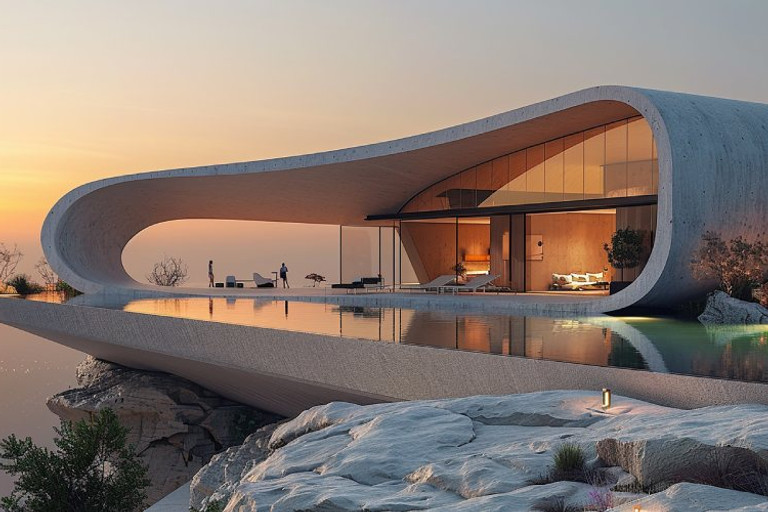
En arquitectura, el fotorrealismo se utiliza para representar edificios y espacios tal como aparecerían en la vida real, a menudo antes de ser construidos. Se enfoca en materiales precisos, condiciones de iluminación, escala y contexto ambiental en lugar de abstracción conceptual o estilística.
Los visuales arquitectónicos fotorrealistas se utilizan comúnmente en presentaciones de diseño, aprobaciones de clientes, materiales de marketing e inmobiliaria. El objetivo es la claridad y el realismo, permitiendo que los espectadores comprendan cómo se verá, sentirá y funcionará un espacio en condiciones reales en lugar de cómo se interpreta artísticamente.
Historia temprana del fotorrealismo
El fotorrealismo surgió en Estados Unidos a finales de los años 60 y principios de los 70.
Se desarrolló a partir del Pop Art y se posicionó en oposición al Expresionismo Abstracto y el Minimalismo, que dominaban la escena artística en ese momento.
Mientras que la abstracción enfatizaba el gesto, la emoción y la expresión subjetiva, el fotorrealismo reorientó la atención hacia la precisión visual y la reproducción de la realidad observable.
El movimiento fue formado por la creciente dominancia de la fotografía como medio principal para registrar el mundo. Los artistas se basaban abiertamente en referencias fotográficas para construir sus imágenes.
Las figuras clave asociadas con el fotorrealismo incluyen Richard Estes, Chuck Close y Ralph Goings, cuyos trabajos ejemplificaban un lenguaje visual altamente detallado basado en la cámara.
A diferencia del realismo tradicional o del trompe-l'œil, el fotorrealismo no intenta engañar al espectador. La imagen se entiende como una representación construida, no como un sustituto de la realidad.
¿Por qué el fotorrealismo importa en la cultura visual moderna?
El fotorrealismo importa en la cultura visual moderna porque genera confianza. Las imágenes que se ven reales son más fáciles de creer, comprender y aceptar, especialmente cuando las audiencias deben tomar decisiones basadas en lo que ven.
Permite evaluar ideas antes de que existan. En arquitectura, diseño, cine y desarrollo de productos, los visuales fotorrealistas reducen la incertidumbre al mostrar resultados realistas por adelantado.
El fotorrealismo también se ajusta a cómo las audiencias modernas consumen visuales. Como la fotografía y el video moldean nuestras expectativas visuales, las imágenes realistas se sienten naturales, creíbles e inmediatamente legibles.
Fotorrealismo vs Hiperrrealismo: Diferencias clave
Aunque tanto el fotorrealismo como el hiperrrealismo buscan crear imágenes realistas, existe una diferencia clave entre ellos. El fotorrealismo se enfoca en crear una representación fiel de lo que verías en una fotografía, mientras que el hiperrrealismo exagera detalles para crear una versión dramática y mejorada de la realidad.
En el arte, el hiperrrealismo a menudo incluye elementos que están sobreenfatizados, como colores más brillantes, contrastes más nítidos o texturas demasiado perfectas para ser reales. El fotorrealismo, en cambio, se basa en lo que es realmente observable en el mundo que nos rodea.
Fotorrealismo vs Hiperrrealismo en arte y fotografía
En el arte y la fotografía tradicionales, el fotorrealismo significa copiar una escena con precisión y detalle, a menudo hasta la sombra o textura más pequeña. El hiperrrealismo va un paso más allá al enfatizar o alterar ciertos elementos, haciéndolos parecer más intensos o perfectos de lo que serían en una escena de la vida real.
Por ejemplo, en el arte hiperrrealista, la piel podría tener un detalle perfecto, pero en fotorrealismo se vería como se ve bajo iluminación normal con imperfecciones naturales. El hiperrrealismo no se preocupa tanto por ser creíble, se trata más bien de crear un impacto emocional a través de la realidad exagerada.
¿Cómo juzgan los espectadores el realismo y los detalles?
Cuando observamos una imagen altamente realista, nuestro cerebro verifica primero los detalles: ¿La iluminación coincide? ¿Las sombras se sienten correctas? ¿La textura es fiel a la vida real? Con fotorrealismo, el objetivo es engañar al espectador para que piense que la imagen podría ser una fotografía.
Sin embargo, el hiperrrealismo llama la atención sobre los detalles, que pueden ser demasiado perfectos, casi como una versión pulida de la realidad. Cuando se observa cuidadosamente, la diferencia entre los dos estilos se hace evidente. El hiperrrealismo a menudo se siente demasiado limpio o idealizado, mientras que el fotorrealismo presenta el mundo real tal como es, con sus imperfecciones.
¿Cómo funciona el fotorrealismo con IA?
La IA produce imágenes fotorrealistas aprendiendo patrones visuales de conjuntos de datos muy grandes de fotografías reales. Durante el entrenamiento, aprende cómo se comporta la luz, cómo reflejan los materiales y cómo las cámaras capturan profundidad, color y detalle. Cuando se solicita correctamente, el resultado puede asemejarse mucho a una fotografía real, incluso si la escena en sí nunca existió.
La IA no comprende la realidad en el sentido humano. En cambio, predice cómo debería verse una imagen realista basándose en patrones estadísticos que ha visto antes. Por eso las imágenes de IA pueden parecer muy convincentes en general, pero aún así fallar en detalles pequeños o sutiles.
¿Qué significa el fotorrealismo con IA en la generación de imágenes?
El fotorrealismo con IA significa que la imagen generada sigue las reglas visuales que el cerebro humano asocia con la fotografía. Estos incluyen iluminación creíble, sombras, reflejos, profundidad y variación de color natural. En esencia, la IA intenta comportarse como una cámara virtual que observa una escena real.
El fotorrealismo no se trata solo de nitidez o resolución. Una imagen puede ser técnicamente nítida pero aún parecer falsa si la iluminación es inconsistente o los materiales se ven poco naturales. El fotorrealismo verdadero depende de que todos los elementos visuales trabajen juntos, desde la perspectiva de la cámara hasta las pequeñas imperfecciones de la superficie.
El papel de los datos de entrenamiento, las indicaciones y las imágenes de referencia
Los datos de entrenamiento, las indicaciones y las imágenes de referencia son los bloques de construcción fundamentales del fotorrealismo con IA. Juntos, moldean cómo se aprende, se guía y se ancla visualmente una imagen.
Comprender sus funciones hace más claro por qué algunas imágenes de IA se sienten convincentemente reales mientras que otras no alcanzan ese nivel.
Este proceso se puede desglosar en tres componentes principales:
Datos de entrenamiento definen lo que la IA entiende como realidad visual normal. Los tipos de imágenes en el conjunto de datos influyen fuertemente en el comportamiento de la iluminación, la apariencia de materiales y el realismo general.
Diversidad y calidad del conjunto de datos afectan si los resultados se ven naturales o artificiales. Los estilos sobrerrepresentados pueden sesgar la salida hacia una apariencia específica.
Datos altamente estilizados o editados pueden llevar a la IA a producir imágenes que parecen pulidas pero menos fotográficas.
Indicaciones actúan como instrucciones visuales de alto nivel que dan forma a la escena. Guían la composición, el ambiente y las expectativas de realismo.
Detalles relacionados con la cámara como la elección de lente, la exposición y las condiciones de iluminación ayudan a alinear los resultados con la fotografía real.
Restricciones claras y lógica física reducen la ambigüedad y previenen interpretaciones poco realistas.
Imágenes de referencia anclan la IA en ejemplos visuales concretos. Ayudan a definir la composición, la perspectiva y las relaciones espaciales.
Referencias de iluminación y materiales mejoran la coherencia en sombras, reflejos y comportamiento de superficies.
Orientación de referencia sólida reduce la incertidumbre y conduce a resultados más confiables y fotorrealistas.
¿Por qué el fotorrealismo de la IA a veces se ve irreal?
Muchas imágenes fracasan debido a pequeños quiebres en la lógica física. Las sombras pueden no alinearse con la fuente de luz, los reflejos pueden incluir objetos que no existen, o los materiales pueden comportarse de manera incoherente. Estos errores suelen ser sutiles pero se registran rápidamente como antinatural.
Otro problema es la perfección excesiva. Las fotografías reales incluyen ruido, irregularidades superficiales y pequeños defectos. Cuando la IA elimina todas las imperfecciones, el resultado puede parecer artificial o demasiado preparado.
Por último, las instrucciones conflictivas pueden reducir el realismo. Mezclar estilos cinematográficos con realismo documental a menudo produce una falta de coherencia visual. Las indicaciones claras y simples normalmente conducen a resultados fotorrealistas más creíbles.
Lista de verificación del realismo visual: ¿Qué hace que una imagen se vea real?
Cuando las personas dicen que una imagen se ve real, generalmente significan que pasa algunas comprobaciones rápidas y subconscientes. La luz debe tener sentido. Los materiales deben comportarse como materiales reales. La cámara debe sentirse humana. Si una parte falla, toda la imagen comienza a parecer artificial.
Una forma práctica de evaluar el realismo es seguir un orden de lista de verificación simple. Primero verifica la iluminación. Luego verifica los materiales. Finalmente verifica la perspectiva y la escala.
Las comprobaciones principales son:
Verifica la coherencia de la iluminación: Asegúrate de que la dirección, intensidad y temperatura de color de la luz se mantengan coherentes en toda la escena.
Verifica el comportamiento de las sombras: Confirma que las sombras se alineen con la fuente de luz y se suavicen o endurezcan de forma natural.
Valida la respuesta del material: Asegúrate de que las superficies reaccionen a la luz de forma realista, sin aspecto plástico o plano.
Ajusta los reflejos al entorno: Comprueba que las superficies reflectantes muestren alrededores creíbles y sin elementos imposibles.
Confirma la perspectiva y la escala: Asegúrate de que el ángulo de cámara, la distancia focal y las proporciones de los objetos se sientan físicamente plausibles.
Establece profundidad visual: Crea una separación clara entre primer plano, plano medio y fondo usando indicios de profundidad naturales.
Introduce imperfecciones sutiles: Añade pequeñas variaciones, defectos de superficie y ruido de luz para evitar un aspecto demasiado perfecto.
Equilibra los colores de forma natural: Mantén los colores naturales, evitando saturación exagerada o cambios de color antinatural.
Respeta la lógica física: Asegúrate de que los objetos obedezcan la gravedad y tengan sentido en los puntos de contacto.
Emula el comportamiento de una cámara real: Limita la imagen a lo que una cámara real podría capturar de forma realista.
IA de fotorrealismo en la práctica: Casos de uso comunes
La IA de fotorrealismo es popular porque convierte ideas en imágenes que se ven reales rápidamente. Los equipos la utilizan para probar conceptos, comunicar opciones y reducir idas y venidas. Los mejores resultados ocurren cuando la IA respalda un objetivo claro, no cuando intenta reemplazar todo el proceso creativo.
En la práctica, la IA de fotorrealismo se utiliza en industrias que necesitan imágenes rápidas con iluminación creíble y materiales. El caso de uso determina qué es más importante, como velocidad, coherencia o detalle fino.
Imágenes de productos, publicidad y comercio electrónico
Las marcas utilizan IA de fotorrealismo para crear imágenes de productos sin una sesión de estudio completa. Esto ayuda cuando un producto aún está en desarrollo o cuando necesitas muchas variaciones rápidamente. También puede respaldar campañas estacionales cambiando fondos, iluminación y estilo mientras se mantiene la apariencia del producto coherente.
En estos flujos de trabajo, el enfoque está en:
Iluminación de estudio limpia y materiales precisos
Ángulos coherentes para series de imágenes de catálogo
Variaciones rápidas para variantes de color, empaques y escenas
Cuando se utiliza con cuidado, la IA reduce costos y acelera la producción de contenido. La revisión humana sigue siendo importante porque los pequeños errores pueden dañar la confianza de la marca.
Visualización de Arquitectura e Interiores
En arquitectura, la IA fotorrealista ayuda a los clientes a comprender el espacio, la luz y los materiales sin necesidad de leer planos. La IA puede apoyar imágenes de conceptos tempranos, estudios rápidos de atmósfera e imágenes de presentación, especialmente cuando los plazos son ajustados.
La clave es mantener la geometría e intención de cámara claras. Si el objetivo es la toma de decisiones, la imagen debe ser legible y realista, no excesivamente cinematográfica. El realismo arquitectónico bueno suele significar luz natural equilibrada, comportamiento creíble de materiales, y escala humana.
Cine, Videojuegos y Concept Art
El cine y los videojuegos utilizan IA fotorrealista para explorar escenas, accesorios e iluminación rápidamente. Apoya moodboards, presentaciones de pitch y exploración de conceptos tempranos. Los equipos pueden probar múltiples entornos o momentos de la historia sin construir primero escenas 3D completas.
En este espacio, el fotorrealismo a menudo se mezcla con la estilización. La imagen puede ser realista pero aun así potenciar la atmósfera, contraste y estado de ánimo de color. La IA ayuda a acelerar la exploración, mientras que los artistas mantienen el control de la narrativa y continuidad visual.
Límites del Fotorrealismo de IA y Cómo Superarlos
El fotorrealismo de IA puede verse impresionante, pero sigue teniendo puntos débiles. Algunos problemas son pequeños, como dedos extraños o texto roto. Otros son más grandes, como mantener la misma persona o habitación consistente en muchas imágenes. Conocer estos límites te ayuda a elegir las soluciones correctas en lugar de culpar a la herramienta.
Una buena mentalidad es tratar la IA como un primer borrador sólido. El objetivo es lograr 80 por ciento de realismo rápidamente, luego refinar el último 20 por ciento con referencias mejores, prompts más inteligentes o edición posterior ligera.
Manos, Rostros, Texto y Pequeños Detalles
Las manos y el texto fallan a menudo porque requieren estructura exacta. Una foto puede ocultar errores, pero una imagen de IA puede crear dedos extras, letras borrosas o detalles extraños de joyería. Los rostros también pueden variar si regeneras muchas veces, especialmente con iluminación diferente.
Para mejorar estos detalles, puedes:
Usar una imagen de referencia clara para el tema
Mantén los prompts cortos y específicos sobre características clave
Corregir pequeños problemas con herramientas Inpainting simples
Estos pasos reducen errores aleatorios y mantienen los detalles más estables.
Consistencia en Múltiples Imágenes y Ángulos
La consistencia es uno de los problemas más difíciles. La IA puede crear una imagen perfecta y luego cambiar la escena en la siguiente. Esto es común en arquitectura, productos y diseño de personajes.
La mejor consistencia generalmente proviene de anclajes más fuertes:
Mantén las mismas notas de cámara y estilo de lente
Usa las mismas imágenes de referencia en toda la serie
Evita cambiar demasiadas cosas a la vez
Incluso con estos pasos, el realismo de múltiples vistas puede seguir variando. El objetivo no es una repetición perfecta, sino una continuidad creíble en toda la serie.
Flujos de trabajo de edición posterior para un realismo más limpio
La edición posterior puede mejorar rápidamente el realismo sin trabajo pesado. Pequeños ajustes en contraste, balance de blancos y nitidez hacen que la imagen se sienta más fotográfica. Corregir pequeños artefactos también elimina la apariencia de IA.
Un flujo de trabajo simple que funciona bien:
Corrige la exposición y el color primero
Limpia artefactos y bordes obvios
Añade ligero grano para reducir la apariencia demasiado perfecta
Este enfoque mantiene el resultado realista mientras se mantiene eficiente.
Ética y confianza en el fotorrealismo de IA
Las imágenes fotorrealistas tienen un peso extra porque las personas las tratan como pruebas. Por eso el fotorrealismo de IA requiere un uso cuidadoso, especialmente en noticias, publicidad y comunicación pública. Si una imagen realista puede ser malinterpretada, la confianza puede romperse rápidamente.
La regla más simple es transparencia. Cuando una imagen fotorrealista es generada por IA, el espectador no debe ser obligado a adivinarlo. Etiquetas claras y contexto honesto protegen tanto a creadores como a audiencias.
Deepfakes, divulgación y uso responsable
Los deepfakes son imágenes o vídeos realistas que imitan a personas o eventos reales. Pueden usarse para entretenimiento, pero también pueden usarse para engañar. Dado que el fotorrealismo puede parecer metraje real, es importante evitar crear contenido que pudiera causar daño.
Un enfoque seguro y profesional incluye:
Revelar cuándo una imagen es generada por IA
Evitar usar rostros de personas reales sin permiso claro
No presentar visuales de IA como prueba del mundo real
Estos hábitos mantienen el trabajo ético y protegen tu reputación.
Derechos de autor, semejanza y derechos comerciales: conceptos básicos
Los derechos de autor dependen de la ubicación y el contexto, por lo que debes considerar esto como orientación general, no como asesoramiento legal. En trabajos comerciales, es importante verificar las licencias de cualquier imagen de referencia, logo o activo de marca que incluyas.
La semejanza es otro punto clave. Si una imagen de IA se parece a una persona específica, es posible que necesites permiso para usarla en anuncios o productos. Para las empresas, el plan más seguro es usar activos con licencia, evitar copiar personas reconocibles y mantener documentación de derechos de uso para cada visual que publiques.
Conclusiones clave
El fotorrealismo se trata de credibilidad, no de estilo. Tiene éxito cuando la iluminación, los materiales y el comportamiento de la cámara coinciden con las expectativas del mundo real.
Los espectadores juzgan el realismo al instante. Los pequeños errores en luz, sombras o escala pueden romper la confianza, incluso en imágenes altamente detalladas.
El fotorrealismo difiere del hiperrrealismo. El fotorrealismo busca coincidir con lo que una cámara captura, mientras que el hiperrrealismo exagera el detalle para impactar.
El fotorrealismo de IA se basa en patrones, no en comprensión. Predice visuales realistas basándose en datos de entrenamiento, lo que explica tanto sus fortalezas como sus fallos.
Los datos de entrenamiento, los prompts y las referencias son importantes. Una dirección clara y referencias visuales fuertes mejoran significativamente el realismo.
El realismo es un sistema. La nitidez por sí sola no es suficiente; la iluminación, los materiales, la perspectiva y las imperfecciones deben trabajar juntas.
El fotorrealismo con IA tiene límites. Problemas como detalles inconsistentes y exceso de perfección requieren revisión y corrección manual.
El uso responsable es esencial. Las imágenes de IA fotorrealistas deben divulgarse claramente para mantener la confianza y evitar usos indebidos.
Preguntas frecuentes
¿El fotorrealismo es solo cuestión de alta resolución?
No. La resolución ayuda, pero el realismo proviene del comportamiento de la luz, la respuesta de los materiales y la lógica de la cámara. Una imagen de menor resolución puede verse más real si esas claves son correctas.
¿Puede el fotorrealismo con IA reproducir el aspecto de una cámara o lente específica?
Sí, hasta cierto punto. Puedes guiarlo con claves de cámara simples como distancia focal y profundidad de campo, pero los resultados varían. La forma más confiable es usar una imagen de referencia sólida.
¿Por qué las imágenes fotorrealistas generadas por IA a veces se ven demasiado lisas?
La IA suele eliminar el ruido y la microtextura para que las imágenes se vean más limpias. Eso puede crear una apariencia plástica o retocada. Añadir imperfecciones sutiles o grano ligero generalmente lo soluciona.
¿Cómo mantengo un estilo fotorrealista consistente en todo un conjunto?
Usa la misma estructura de prompt, las mismas claves de cámara e imágenes de referencia iguales. También mantén las condiciones de iluminación consistentes. Los cambios pequeños y controlados funcionan mejor que saltos grandes.
¿Es seguro usar fotorrealismo de IA en proyectos comerciales?
Puede serlo, pero debes verificar las licencias y evitar usar personas reconocibles o activos de marca sin permiso. La divulgación clara y la documentación ayudan a protegerel uso comercial.
¿Significa fotorrealismo que una imagen debe verse perfecta?
No. Las imágenes perfectas suelen parecer artificiales. Las fotografías reales incluyen pequeños defectos como ruido, iluminación desigual, desenfoque y desgaste. El fotorrealismo se trata de plausibilidad, no de perfección visual.
¿Puede una imagen ser fotorrealista incluso si la escena nunca existió?
Sí. El fotorrealismo se juzga por la lógica visual, no por la realidad factual. Si la iluminación, los materiales, la perspectiva y el comportamiento de la cámara siguen reglas del mundo real, la imagen puede parecer creíble incluso si la escena es ficticia.
¿Por qué las imágenes altamente detalladas a veces todavía parecen falsas?
Porque el realismo no está impulsado solo por el detalle. La iluminación inconsistente, las reflexiones incorrectas o la escala equivocada rompen el realismo más rápido que la baja resolución. El cerebro prioriza la lógica física sobre el detalle superficial.
¿Qué tan importante es el comportamiento de la cámara en el fotorrealismo?
Muy importante. La altura de la cámara, el ángulo y la elección del lente afectan fuertemente al realismo. Una imagen puede fallar simplemente porque la cámara parece físicamente imposible o inconsistente con la perspectiva humana.
¿Pueden las imágenes estilizadas seguir usando principios fotorrealistas?
Sí. Muchos visuales estilizados se basan en iluminación realista, respuesta de materiales y lógica de cámara para sentirse arraigados. El fotorrealismo a menudo actúa como base, incluso cuando el aspecto final es estilizado.
¿Por qué el fotorrealismo importa más con imágenes de IA?
Porque las imágenes generadas por IA se juzgan más críticamente. Cuando los espectadores saben que una imagen se creó instantáneamente, los pequeños errores de realismo destacan más rápido, haciendo que el fotorrealismo sea esencial para la credibilidad.
¿Se puede evaluar el fotorrealismo de forma sistemática?
En parte. Aunque el gusto varía, muchas señales de realismo son predecibles. La dirección de la iluminación, la lógica de las sombras, el comportamiento de los materiales, la escala y la perspectiva de la cámara se pueden revisar usando una lista de control clara.
¿Entiende la IA las reglas físicas como la gravedad o la estructura?
No. La IA no entiende la física. Imita patrones visuales que sugieren lógica física, por eso los errores aparecen en escenas complejas o situaciones desconocidas.
¿Por qué las imágenes fotorrealistas de IA a menudo se ven demasiado limpias o suaves?
La IA tiende a eliminar el ruido y las imperfecciones micro porque ha aprendido de imágenes pulidas. Añadir grano sutil, variación de textura y pequeños defectos generalmente mejora el realismo.
¿Puede el fotorrealismo de IA reemplazar el renderizado o la fotografía tradicional?
No completamente. La IA es excelente para velocidad y exploración, mientras que los métodos tradicionales ofrecen control y consistencia. En la práctica, los flujos de trabajo más sólidos a menudo combinan ambos.
¿Cuánta participación humana sigue siendo necesaria?
Generalmente poca, pero importa mucho. Los pequeños ajustes humanos en el balance de iluminación, color, imperfecciones y artefactos pueden elevar significativamente el realismo y la credibilidad.
¿Cuándo Deberías Evitar el Fotorrealismo?
Cuando la claridad, la abstracción o la exploración conceptual son más importantes que el realismo. La ideación temprana, los diagramas y los visuales expresivos a menudo se benefician de una representación más suelta.