Aggiornato il: 13 gennaio 2026
I concetti architettonici spesso iniziano come idee astratte che sembrano difficili da tradurre in immagini convincenti. Molti progetti perdono chiarezza quando l'ispirazione iniziale non riesce a guidare le decisioni di visualizzazione successive.
Il processo da moodboard architettonico a render realistico colma questa lacuna trasformando l'emozione, l'intento materiale e l'atmosfera in immagini costruibili. Quando gestito correttamente, crea coerenza tra il concetto, lo sviluppo del design e la presentazione finale.
Questa guida spiega cosa include un moodboard architettonico, introduce 9 tipi essenziali di moodboard e mostra come trasformarli in render realistici utilizzando strumenti AI.


Render di interior design di un caffè da moodboard di texture (modulo Moodboard to Render di ArchiVinci)
Cos'è un Moodboard Architettonico?
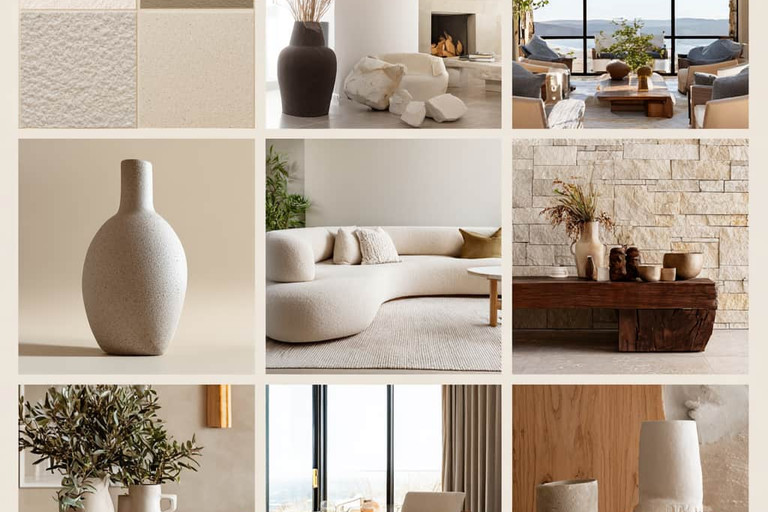
Un moodboard architettonico è una raccolta visiva di immagini, materiali, colori e texture utilizzata per definire lo stile e l'atmosfera di un progetto architettonico. Aiuta architetti e designer a organizzare i riferimenti in un unico luogo e a comunicare chiaramente l'intento progettuale in una fase iniziale.
Piuttosto che presentare soluzioni progettuali finali, un moodboard supporta l'esplorazione e l'allineamento. Consente di confrontare, affinare e discutere diverse idee prima di passare a disegni dettagliati, modellazione 3D o visualizzazione.
Durante tutto il processo di progettazione, il moodboard funge da punto di riferimento, aiutando a garantire coerenza nei materiali, nei colori e nel carattere spaziale complessivo dello sviluppo del progetto.

Comprendere il Ruolo di un Moodboard Architettonico nella Visualizzazione
Un moodboard architettonico è uno strumento pratico utilizzato per definire la direzione visiva e l'atmosfera di un progetto in una fase iniziale. Aiuta a trasformare le idee astratte in un intento progettuale chiaro e comunicabile prima che inizi la modellazione o il rendering dettagliato.
Piuttosto che servire solo come ispirazione, un moodboard stabilisce un quadro visivo condiviso. Riunisce materiali, colori, texture, riferimenti di illuminazione e indizi spaziali per guidare la visualizzazione architettonica in modo coerente.
Questa chiarezza diventa particolarmente importante durante la modellazione e il rendering. Senza un chiaro riferimento, l'interpretazione soggettiva può facilmente alterare il carattere architettonico. Un moodboard ben strutturato aiuta a mantenere la continuità dal concetto alla visualizzazione.
I moodboard supportano inoltre il processo decisionale durante lo sviluppo del progetto. Permettono agli architetti e ai progettisti di testare le direzioni visive sin dall'inizio, riducendo le revisioni non necessarie più avanti nel processo di visualizzazione.
Altrettanto importante, un moodboard architettonico funge da strumento di comunicazione. Allinea architetti, interior designer e team di visualizzazione intorno agli stessi obiettivi e aspettative visive.
Quando questo allineamento è raggiunto, i render architettonici realistici possono comunicare più della forma e della scala. Cominciano a esprimere l'atmosfera, la profondità dei materiali e il carattere spaziale, garantendo che le visive finali rimangano fedeli all'intento architettonico originale.
6 ruoli chiave di un moodboard architettonico
Definire l'intento progettuale
Un moodboard architettonico aiuta tutti a comprendere quello che il progetto vuole esprimere sin dall'inizio. Dà forma alle idee iniziali mostrando l'atmosfera, lo stato d'animo e il carattere previsti dello spazio.
Avere questo riferimento sin dall'inizio rende più facile restare fedeli al concetto originale mentre il progetto si sviluppa.
Stabilire la coerenza visiva
Un moodboard riunisce materiali, colori, texture e illuminazione in un'unica raccolta. Questo aiuta a garantire che tutte le decisioni visive si relazionino alla stessa idea.
Senza questo riferimento, i dettagli possono facilmente discostarsi. Il moodboard aiuta il progetto a sembrare coerente piuttosto che frammentato.
Guidare il flusso di lavoro della visualizzazione
Durante la modellazione e il rendering, il moodboard agisce come guida pratica. Aiuta gli artisti di visualizzazione a comprendere come i materiali devono apparire, come la luce deve comportarsi e come l'atmosfera deve essere trasmessa.
Invece di affidarsi a supposizioni, le decisioni vengono prese facendo riferimento a riferimenti visivi chiari, rendendo il flusso di lavoro più focalizzato.
Supportare le scelte progettuali
Le moodboard rendono più facile esplorare diverse opzioni visive fin dall'inizio. Architetti e designer possono confrontare le idee prima di impegnarsi in un lavoro dettagliato.
Affrontare queste domande fin dall'inizio aiuta a ridurre le revisioni e a procedere nel progetto con sicurezza.
Migliorare la comunicazione del team
Una moodboard architettonica crea un linguaggio visivo condiviso per tutti gli interessati. Aiuta architetti, designer d'interni e team di visualizzazione a comunicare più chiaramente.
Questa comprensione condivisa porta a feedback più efficace e a una collaborazione più fluida.
Migliorare il realismo dei render
I forti render architettonici non riguardano solo la geometria accurata. Si tratta di come spazio, materiale e luce si combinano insieme.
Ancorando i render a riferimenti visivi ben definiti, la moodboard aiuta le immagini a sembrare credibili e allineate con l'intento architettonico dietro il progetto.
Che cosa include una moodboard architettonica?
Una moodboard architettonica aiuta tutti a mettersi d'accordo fin dall'inizio del processo. Prima che i disegni diventino dettagliati o che i render inizino, fissa una direzione chiara per l'aspetto e l'atmosfera che il progetto dovrebbe avere. È meno una questione di decisioni finali e più una questione di definire l'intento.
Campioni di materiale: Legno, calcestruzzo, pietra, metallo o tessuti sono solitamente il punto di partenza. Non si tratta di selezioni di prodotti, ma di riferimenti che spiegano il carattere del materiale, il peso e la tattilità. Aiutano a chiarire se uno spazio deve avere un'atmosfera pesante o leggera, ruvida o raffinata.
Tavolozze di colore: Le tavolozze di colore aiutano a definire presto l'atmosfera generale. Creano limiti che impediscono al design di deviare in seguito. Una volta che la tavolozza è chiara, le decisioni su finiture e illuminazione diventano più semplici.
Riferimenti di texture: Le texture mostrano come le superfici dovrebbero presentarsi sia da vicino che nello spazio. Questo è particolarmente importante per la visualizzazione, dove la qualità della superficie gioca un ruolo fondamentale nel realismo.
Immagini di ispirazione: Provengono spesso da edifici, interni, paesaggi o progetti di riferimento. Non sono pensate per essere copiate, ma utilizzate per comunicare il carattere spaziale, la proporzione e l'atmosfera in modo rapido e visivo.
Concetti di illuminazione e atmosfera: I riferimenti di illuminazione descrivono come la luce naturale e artificiale dovrebbe modellare lo spazio durante la giornata. Aiutano a guidare sia le decisioni di design che i setup di rendering.
Pattern e forme: I pattern e le forme aiutano a spiegare la logica sottostante del design. Supportano la coerenza nella forma, nel ritmo e nel linguaggio visivo di tutto il progetto.
Parole concettuali o parole chiave: Un piccolo insieme di parole forti aiuta a mantenere il progetto focalizzato. Quando le decisioni diventano poco chiare, queste parole chiave riportano la discussione all'intento originale.
Riferimenti di scala e proporzione: Le immagini che mostrano persone nello spazio, le altezze dei soffitti o l'apertura spaziale aiutano tutti a comprendere come l'architettura dovrebbe sentirsi quando viene utilizzata.
Riferimenti contestuali: Le foto del sito, gli edifici circostanti, le condizioni climatiche e il contesto culturale mantengono il progetto radicato nel suo ambiente reale.
Combinazioni e transizioni di materiali: Mostrare come i materiali si incontrano aiuta a evitare giunzioni imbarazzanti in seguito. Questi riferimenti supportano una detailing più pulita sia nel design che nella visualizzazione.
Effetti atmosferici: Elementi come ombre, riflessi, trasparenza, verde o acqua aiutano a modellare l'atmosfera e la morbidezza spaziale.
Indizi di esperienza utente: Le immagini che mostrano il movimento e l'uso quotidiano aiutano a spostare l'attenzione dalle immagini statiche allo spazio vissuto.
In pratica, una buona moodboard architettonica è uno strumento di lavoro. Supporta una comunicazione più chiara, uno sviluppo del progetto più stabile e visualizzazioni architettoniche più convincenti.


Render di interior design living room naturale da moodboard di texture (modulo ArchiVinci Moodboard to render)
Elenco di controllo qualità moodboard (Prima di renderizzare)
Prima di passare dalla moodboard al rendering, vale la pena prendersi un momento per verificare se la board sta svolgendo il suo ruolo in modo chiaro. Una moodboard forte riduce gli errori di interpretazione successivi e porta a risultati più coerenti e realistici.
Utilizza l'elenco di controllo sottostante per valutare la prontezza:
L'atmosfera complessiva è chiara a prima vista?
La board dovrebbe comunicare un'atmosfera o un'emozione dominante senza spiegazioni. Se l'atmosfera sembra mista o poco chiara, il render probabilmente rifletterà quella confusione.
Le qualità dei materiali sono leggibili?
I materiali dovrebbero suggerire chiaramente il comportamento della superficie, come ruvidità, morbidezza, riflettività o peso. Evita riferimenti in cui le finiture sono ambigue o eccessivamente filtrate.
La palette cromatica è coerente?
I colori dovrebbero relazionarsi gli uni agli altri e supportare una direzione tonale coerente. Verifica che i colori di accento siano intenzionali e non in competizione con i toni dominanti.
La board suggerisce condizioni di illuminazione?
Dovrebbe esserci una chiara percezione della qualità della luce, come ad esempio luce naturale rispetto a luce artificiale, morbidezza rispetto a contrasto e luminosità complessiva. L'ambiguità nell'illuminazione spesso porta a render piatti.
La sensazione di scala e spazialità è implicita?
I riferimenti dovrebbero suggerire proporzione, altezza del soffitto, apertura o intimità. Anche le board astratte traggono beneficio da almeno un'immagine che suggerisca la scala umana.
Gli stili sono allineati o intenzionalmente contrapposti?
È possibile mescolare gli stili, ma solo se il contrasto è deliberato. Se gli stili si scontrano involontariamente, chiarire la gerarchia o semplificare la board.
C'è una chiara priorità?
Un materiale, un'atmosfera o un'idea spaziale dovrebbe guidare la board. I riferimenti di supporto dovrebbero rafforzare questa direzione principale piuttosto che competere con essa.
La board è concisa?
Meno immagini forti sono meglio di molte deboli. Se rimuovere un'immagine non cambia il messaggio complessivo, probabilmente non appartiene alla board.
Se la maggior parte di questi punti può essere affrontata con sicurezza, la moodboard è pronta per passare alla fase di rendering. Se no, affinare prima la board farà risparmiare tempo e migliorerà la qualità degli oggetti visivi finali.
9 tipi di moodboard architettoniche
1. Moodboard concettuale
Una moodboard concettuale viene preparata all'inizio del processo di progettazione. Definisce la direzione emotiva e atmosferica del progetto prima che vengano prese decisioni concrete.
Questo tipo di moodboard è ispirativo ed espressivo, concentrandosi su atmosfera, tono e idee generali piuttosto che su materiali o dettagli specifici. Tipicamente include riferimenti artistici, texture astratte, immagini della natura, fotografia e parole chiave concettuali.
Il suo scopo è stabilire la narrativa complessiva del progetto e allineare designer e clienti intorno a una direzione condivisa. Inoltre, definisce il tono per le successive decisioni progettuali.
È meglio utilizzata per presentazioni iniziali, brainstorming e definizione della direzione creativa.
2. Moodboard di Materiali
Una moodboard di materiali si concentra sulle qualità fisiche del progetto e su come i materiali si relazionano tra loro.
Include campioni di materiali reali come legno, pietra, metallo o tessuti, o immagini di alta qualità dei materiali quando i campioni non sono disponibili. Campioni di colore e variazioni di finitura sono spesso inclusi per confrontare le opzioni.
Il suo scopo è comunicare chiaramente l'intenzione materiale e supportare la valutazione della compatibilità, della fattibilità e delle considerazioni di budget.
Le moodboard di materiali sono meglio utilizzate per design d'interni, studi di facciate e calendari delle finiture.
3. Moodboard di Colore
Una moodboard di colore definisce la strategia cromatica e l'equilibrio tonale del progetto.
Solitamente include palette di colori definiti o famiglie tonali, insieme a riferimenti di luce e ombra che mostrano come i colori si comportano nello spazio.
L'obiettivo è garantire la coerenza del colore tra i materiali e gli spazi e, in alcuni casi, supportare le decisioni di branding.
I moodboard di colore sono più adatti per palette interne, spazi guidati dal marchio e progetti di hospitality.
4. Moodboard di stile visivo
Un moodboard di stile visivo definisce il linguaggio architettonico del progetto.
Include riferimenti a stili architettonici come approcci minimalista, brutalista, scandinavo, industriale o contemporaneo. Insieme a questi, presenta esempi di proporzioni spaziali, volumetria e linguaggio di design tratti da precedenti rilevanti.
Lo scopo è allineare tutti i membri del team attorno a uno stile architettonico coerente e chiarire le aspettative nelle prime fasi del processo.
I moodboard di stile visivo sono più adatti per presentazioni di concept, gare competitive e design schematico iniziale.
5. Moodboard spaziale
Un moodboard spaziale si concentra sulla scala, il flusso e l'atmosfera spaziale.
Include immagini di esperienze spaziali, riferimenti sulla direzione della luce e relazioni interno-esterno che descrivono come lo spazio dovrebbe essere percepito.
Lo scopo è supportare l'esperienza utente, le decisioni di volumetria e layout, in particolare nelle fasi iniziali.
I moodboard spaziali sono più adatti per architettura interna, edifici pubblici, e pianificazione spaziale concettuale.
6. Moodboard di illuminazione
Un moodboard di illuminazione si concentra su strategie di illuminazione naturale e su come la luce modella gli spazi interni.
Include studi solari, pattern d'ombra, riferimenti di illuminazione diffusa ed esempi di illuminazione artificiale. Concetti di apparecchi e gamme di temperatura di colore sono spesso inclusi per supportare le decisioni di progettazione dell'illuminazione interna.
Il suo scopo è comunicare l'intento di illuminazione e guidare la successiva progettazione dell'illuminazione interna e la selezione dei dispositivi.
I moodboard di illuminazione sono ideali per progetti di interior design, musei, hospitality e retail.
7. Moodboard digitale
Un moodboard digitale viene creato utilizzando strumenti software come Photoshop, InDesign, Canva, Miro, o Figma.
È flessibile, modificabile e facile da condividere, permettendo aggiornamenti rapidi e collaborazione.
Il suo scopo è supportare lo sviluppo del design nelle prime fasi e i flussi di lavoro remoti.
I moodboard digitali sono ideali per presentazioni professionali, elaborati scolastici e lavoro con clienti remoti.
8. Moodboard fisico
Un moodboard fisico utilizza elementi tangibili ed è spesso prodotto in ambienti di studio.
Include campioni di materiali reali, immagini stampate e schizzi, consentendo un coinvolgimento diretto con le qualità dei materiali.
Il suo scopo è supportare la valutazione dei materiali e la validazione finale del progetto.
Le moodboard fisiche sono ideali per progetti residenziali di alta gamma, design per l'ospitalità e presentazioni ai clienti.
9. Moodboard Ibrida
Una moodboard ibrida combina approcci digitali e fisici.
Utilizza board digitali per il concetto e l'iterazione e board fisiche per le decisioni sui materiali.
Il suo scopo è colmare il divario tra sviluppo del concetto e esecuzione.
Le moodboard ibride sono ideali per grandi studi di architettura e team di design multidisciplinari.
Come Trasformare una Moodboard Architettonica in Render Realistici?
Trasformare una moodboard in render realistici consiste essenzialmente nel portare un'idea attraverso l'intero processo di visualizzazione. Una moodboard definisce l'intenzione, ma la qualità del render finale dipende da quanto attentamente quell'intenzione viene tradotta in modellazione, materiali e illuminazione. Se gestito bene, il processo risulta naturale e controllato piuttosto che forzato.
Estrazione di Informazioni Pronte per il Rendering da una Moodboard
Il primo passo è osservare la moodboard con occhio critico. Invece di leggerla come ispirazione, deve essere letta come informazione.
Presta attenzione al comportamento dei materiali, come le superfici ruvide o riflettenti appaiono. Osserva le qualità dell'illuminazione, inclusi direzione, morbidezza e temperatura del colore. Le relazioni cromatiche e l'atmosfera spaziale complessiva sono ugualmente importanti, poiché descrivono come lo spazio dovrebbe trasmettere sensazioni piuttosto che solo il suo aspetto.
Questo passaggio aiuta a mantenere la traduzione dal moodboard al render coerente e previene decisioni soggettive in seguito.
Traduzione dei riferimenti del moodboard nella modellazione 3D
Una volta chiarito l'intento visivo, la modellazione diventa un processo di interpretazione. I riferimenti guidano proporzione, scala e forma complessiva, non una replicazione esatta.
Strumenti come SketchUp vengono spesso utilizzati per il massing rapido, mentre Rhino 3D supporta geometrie più complesse. Per la modellazione dettagliata e la visualizzazione, Blender o Autodesk 3ds Max sono comunemente utilizzati.
In questa fase, concentrarsi sul massing e sulle relazioni spaziali è più importante dei dettagli minuti. La complessità del modello dovrebbe aumentare solo se necessario.
Applicazione dei materiali in base all'intento del moodboard
I materiali svolgono un ruolo importante nel determinare il realismo di un render. Ogni superficie dovrebbe riflettere le qualità suggerite dal moodboard, piuttosto che affidarsi a impostazioni predefinite.
Inizia con materiali base che corrispondono al colore e alla texture complessivi, quindi affina gradualmente parametri come ruvidità, lucidità e profondità della superficie. Questo approccio graduale aiuta a garantire che il rendering basato su riferimenti rimanga allineato all'intento di design originale.
Configurazione dell'illuminazione ispirata all'atmosfera del moodboard
L'illuminazione è spesso il momento in cui l'atmosfera di un progetto si realizza davvero. Anche quando un moodboard non mostra configurazioni tecniche di illuminazione, di solito comunica un'atmosfera chiara.
Riprodurre accuratamente il comportamento della luce naturale e artificiale è fondamentale per risultati fotorealistici.
I motori di rendering come V-Ray e Corona Renderer consentono un controllo preciso dell'esposizione, della temperatura di colore e della morbidezza delle ombre.
Le scelte di illuminazione devono sempre essere verificate rispetto al moodboard per mantenere coerente il tono emotivo.
Software di rendering e motori di visualizzazione
La scelta del motore di rendering incide sia sul flusso di lavoro che sull'output. Gli strumenti real-time sono spesso utili durante lo sviluppo del progetto, mentre i renderer offline sono preferiti per le immagini finali dove l'accuratezza è più importante.
Piattaforme come Lumion, Enscape e Twinmotion supportano l'iterazione veloce e la comunicazione chiara. La chiave è scegliere lo strumento giusto per lo stadio del progetto.
Affinamento e post-produzione per il realismo
La post-produzione è il tocco finale, non un passo correttivo. Il suo ruolo è supportare la chiarezza e l'atmosfera piuttosto che compensare questioni irrisolte.
I tipici aggiustamenti includono il bilanciamento del colore, il controllo del contrasto, l'affinamento dell'esposizione e la sottile profondità atmosferica. Quando le decisioni precedenti sono solide, la post-produzione rimane minima ed efficace.
ArchiVinci: Soluzione AI per generare render dal moodboard
Il generatore AI da moodboard a render di ArchiVinci rende facile trasformare un moodboard in un render realistico. Carica il tuo board, scrivi un breve prompt e i risultati arrivano in pochi minuti. Per esplorare varianti, modifica leggermente il prompt o prova a rigenerare.
Puoi anche mescolare due stili o aggiungere un elemento non presente sul tuo board usando carica immagine per includerlo nell'output. Caricare più moodboard ti consente di vedere anche combinazioni miste. Scegli il tuo preferito e prosegui con sicurezza.
Utilizzo crediti: Qualità normale 1 coin, qualità alta 3 coin.


Flusso Veloce: Dal Moodboard al Render
Carica e Leggi il Moodboard
Carica il tuo moodboard e lascia che ArchiVinci legga gli spunti di stile, i materiali, i colori e le forme. Lo strumento mappa questi elementi alle opzioni di layout, illuminazione e texture mantenendo coerenza con il tuo tema senza limitarti.
Consiglio: un moodboard equilibrato con 3-5 immagini rende la lettura più chiara.
Scrivi un Prompt Chiaro
Mantienilo breve e specifico. Inizia con un obiettivo chiaro, poi aggiungi stile, materiali e illuminazione in linguaggio semplice. Termina con vincoli di layout o qualità se necessario.
Prompt di Esempio:
"Trasforma questo moodboard in un render realistico di living room, mantieni quercia calda e texture in lino, illuminazione serale morbida, arredo minimal, ombre pulite."
"Genera un interno di caffetteria da questo moodboard, conserva il pavimento in terrazzo e gli accenti in ottone, luce diurna brillante, nessun disordine, camera all'altezza degli occhi."
"Crea un render di lobby basato su questo moodboard, mantieni travertino e noce, aggiungi illuminazione diffusa dall'alto, grandangolo, riflessi equilibrati."
Genera 2-3 Variazioni Pulite
Prova con 2 o 3 versioni in modo che le differenze siano facili da confrontare. Se iteri, cambia una sola cosa per volta, come l'illuminazione prima e i materiali dopo. Questo semplifica le scelte e ti aiuta a selezionare il tuo preferito con sicurezza.
Crea una Moodboard Solida
Una tavola d'ispirazione focalizzata aiuta ArchiVinci a leggere rapidamente le tue intenzioni. Punta su un set compatto di immagini che mostrino materiali, temperatura del colore e forme chiave in modo che l'AI mantenga lo stile coerente durante la generazione delle opzioni.
Materiali, Colori, Riferimenti
Includi campioni chiari delle superfici che desideri realmente, più riferimenti spaziali per suggerire proporzioni e altezza della camera. Mantieni i campioni di colore semplici in modo che il modello comprenda la palette senza confusione.
Regole e Controindicazioni per gli Input
Sì: Usa immagini ad alta risoluzione, evita filtri pesanti e raggruppa stili simili insieme in modo che la lettura rimanga nitida.
No: Non mischiare epoche conflittuali su una sola tavola né sovraccaricarla di testo; una tavola pulita per idea è la soluzione migliore.
Mappatura di Materiali e Texture
Indicazioni chiare sui materiali aiutano il modello a rimanere fedele alla tua moodboard durante la mappatura delle texture. Definire il tipo di superficie, la finitura e il posizionamento esatto consente alle texture di essere mappate in modo coerente e di apparire dove devono nella scena.
Usare un materiale ancora di riferimento supportato da una palette contenuta migliora l'accuratezza della mappatura delle texture e aiuta a mantenere la coerenza visiva nelle diverse variazioni di render.
Indicazioni di Superficie nei Prompt
Scrivi righe brevi e chiare che colleghino il materiale alla posizione: "pavimento in travertino, finitura levigata, bassa riflettanza", "pannelli parete in noce, venatura verticale", "tappezzeria in lino, trama morbida". Aggiungi note di scala come "piastrelle formato grande" o "venatura fine" affinché il render rispetti il livello di dettaglio.
Evitare la variazione delle texture
Se le texture cambiano, ricorda al modello cosa mantenere e dove: "travertino solo sul pavimento, nessuna pietra a muro", "metallo opaco sugli infissi, nessun cromato", "tonalità di quercia uniforme sulla falegnameria". Quando iteri, cambia una sola variabile per round in modo da vedere quale regolazione stabilizza la coerenza.
Illuminazione che corrisponde all'atmosfera
Una buona illuminazione trasporta il feeling della board nel render. Indica l'ora del giorno, la luminosità generale e dove la luce deve cadere affinché i materiali si leggano fedelmente.
Luce naturale rispetto a illuminazione interna
Se vuoi luce naturale, scrivi "luce morbida al mattino" o "luminoso e nuvoloso" e nota la direzione della finestra se rilevante. Per interni, evidenzia il lavaggio del soffitto, le strisce sotto i pensili o un sospensione affinché la scena risulti equilibrata.
Ombre, riflessi luminosi e riflessioni
Nota la morbidezza delle ombre, l'intensità dei riflessi su superfici lucide e come gli elementi riflettenti dovrebbero comportarsi, ad esempio "metallo opaco, riflessi delicati, riflessioni controllate sulla pietra".
Suggerimenti per prompt chiari e risultati nitidi
I prompt chiari e concisi mantengono il render vicino alla tua intenzione. Mira a un solo obiettivo, alcuni vincoli e una semplice nota sulla qualità affinché l'output rimanga focalizzato.
Obiettivo, vincoli, bonus
Scrivi una riga per l'obiettivo, una per vincoli come materiali o distanze, e una riga opzionale per extra.
Esempio:
"Atrio realistico da questo moodboard, mantenere pavimento in travertino e pannelli in noce, luce naturale soft, punto di vista a livello degli occhi, riflessi netti sulla pietra".
Iterazioni a Singola Modifica
Quando confronti versioni, modifica una sola cosa per volta come l'illuminazione, la fotocamera o un singolo materiale. Questo rende le differenze leggibili e ti aiuta a scegliere il tuo preferito con sicurezza.
Errori comuni da evitare
Tavole Sovraccariche
Troppi stili in una sola tavola confondono il modello. Mantieni un set coeso in modo che la direzione visiva rimanga chiara.
Indicazioni Vaghe
"Rendilo bello" non dice nulla all'AI. Specifica un obiettivo, i materiali principali e l'illuminazione affinché il risultato rimanga coerente.
Modificare Troppo tra i Cicli
Itera con una modifica alla volta. È più facile leggere le differenze e scegliere con sicurezza.
Disallineamento tra Illuminazione e Materiali
Legni caldi sotto una luce fredda risultano sgradevoli. Allinea l'illuminazione alla palette affinché le texture si leggano in modo autentico.
Caricamenti di bassa qualità
Le immagini sfocate o filtrate nascondono i segnali di texture. Carica fonti pulite affinché ArchiVinci colga i dettagli.

Punti Chiave
I moodboard architettonici sono strumenti di decisione, non solo fonti di ispirazione. Quando utilizzati correttamente, traducono idee astratte in una logica visiva chiara che può guidare l'intero processo di visualizzazione.
Un moodboard forte crea continuità dal concept al render, aiutando l'intento progettuale a sopravvivere al passaggio dalle idee iniziali all'imagery dettagliata e realistica.
Leggere un moodboard come dato visivo è essenziale. Materiali, comportamento dell'illuminazione, relazioni cromatiche e atmosfera spaziale devono essere interpretati consapevolmente, non intuitivamente.
Diversi tipi di moodboard supportano diversi momenti del workflow. I moodboard di concept, materiale, colore, spaziali e di illuminazione svolgono ciascuno un ruolo distinto nel definire i risultati architettonici.
I render realistici sono costruiti attraverso interpretazione controllata, non replicazione. Geometria, materiali e illuminazione devono rispondere all'intento del moodboard piuttosto che copiarne le immagini.
Gli strumenti AI diventano più efficaci quando l'input è chiaro. Board focalizzati, prompt precisi e iterazione disciplinata portano a risultati coerenti e affidabili.
La semplicità migliora l'accuratezza. Meno riferimenti, priorità chiare e iterazioni a singolo cambio aiutano a prevenire la deriva visiva e mantenere la coerenza.
Quando l'intento progettuale è chiaramente definito e consistentemente tradotto, strumenti come il modulo ArchiVinci AI Moodboard to Render permettono agli architetti di passare dall'ispirazione a visual convincenti con velocità, controllo e sicurezza.
Domande frequenti
In che modo i moodboard interni ed esterni differiscono nelle esigenze di rendering quando si utilizza il modulo ArchiVinci AI Moodboard to Render?
I moodboard interni si concentrano maggiormente su tatticità dei materiali, illuminazione artificiale, temperatura di colore e scala umana. Piccoli cambiamenti in texture, riflessione o morbidezza della luce possono influenzare significativamente il realismo.
Le moodboard esterne enfatizzano la composizione volumetrica, le proporzioni, il contesto e la luce naturale. I fattori ambientali come le condizioni del cielo, le ombre e gli elementi circostanti giocano un ruolo più importante rispetto ai dettagli materici fini.
Una moodboard può supportare più stili architettonici nel modulo ArchiVinci?
Sì, ma richiede controllo. Una singola moodboard può supportare più stili se sono strettamente correlati o intenzionalmente mescolati.
Il modulo funziona meglio quando una direzione stilistica è chiaramente dominante. Senza una gerarchia definita, i riferimenti misti possono ridurre la coerenza visiva.
Quante immagini di riferimento dovrebbe includere una moodboard per un rendering AI accurato nel modulo ArchiVinci?
Una moodboard focalizzata con 3-5 immagini di alta qualità di solito funziona meglio. Fornisce informazioni visive sufficienti senza sovraccaricare l'interpretazione.
Poche immagini possono portare a risultati vaghi, mentre troppe possono diluire la direzione intesa.
Quali informazioni devono essere scritte nel prompt rispetto a quelle mostrate nella moodboard quando si utilizza il modulo ArchiVinci?
La moodboard dovrebbe comunicare qualità visive come materiali, colori, texture e atmosfera generale.
Il prompt dovrebbe definire l'intento e i vincoli, incluso il tipo di spazio, le condizioni di illuminazione, la posizione della telecamera, il livello di realismo e gli elementi che devono essere preservati o evitati.
Come possono i progettisti prevenire lo slittamento dello stile o dei materiali quando si iterano i render con il modulo ArchiVinci?
L'approccio più affidabile è modificare una sola variabile per iterazione, come l'illuminazione, i materiali o la posizione della telecamera.
Se si verifica un deviamento, i vincoli chiave devono essere riespressi chiaramente affinché il modulo comprenda cosa deve rimanere coerente tra le versioni.
Quanto controllo creativo consente il modulo ArchiVinci AI Moodboard to Render dopo il primo render?
Il modulo offre un alto livello di controllo creativo attraverso il perfezionamento dei prompt, la rigenerazione e l'aggiornamento dei riferimenti.
Materiali, enfasi dell'illuminazione, direzione del layout e elementi aggiunti possono essere regolati senza riavviare il flusso di lavoro. Ogni iterazione si basa sull'intenzione precedente.
Come interpreta il modulo ArchiVinci i riferimenti conflittuali all'interno di una singola moodboard?
Quando i riferimenti entrano in conflitto, il modulo cerca schemi visivi dominanti, come materiali ripetuti, colori o indizi spaziali.
Se i conflitti sono intenzionali, dovrebbero essere spiegati chiaramente. Altrimenti, il sistema potrebbe fare una media degli input, il che può ridurre la chiarezza. Una chiara prioritizzazione conduce a risultati più prevedibili.
Quali tipi di file posso caricare come moodboard nel modulo ArchiVinci?
I file JPG e PNG funzionano meglio. Le immagini dovrebbero essere pulite, ad alta risoluzione e prive di filtri pesanti in modo che i dettagli di materiali e texture rimangano leggibili.
Posso combinare board o aggiungere riferimenti aggiuntivi nel modulo ArchiVinci Moodboard AI?
Sì. Puoi caricare più moodboard o aggiungere immagini di riferimento aggiuntive, come foto di mobili o prodotti.
Per mantenere la coerenza, descrivi come i riferimenti dovrebbero essere combinati affinché il modulo possa interpretarli correttamente.
Come controllo lo stile, i materiali e l'illuminazione senza preset nel modulo ArchiVinci?
Il controllo si ottiene interamente attraverso il prompt. Usa descrizioni brevi e dirette come "quercia calda e lino", "pavimento in travertino", o "luce morbida del mattino".
Un linguaggio semplice aiuta il modulo a mantenersi concentrato senza affidarsi a stili predefiniti.
Il render corrisponderà esattamente alla mia board quando utilizzo il modulo ArchiVinci?
No. L'output non è una copia uno a uno. Aspettati un allineamento forte in atmosfera, materiali e mood, non una replica esatta.
Se qualcosa si discosta, rinforza i vincoli in modo che il modulo sappia cosa mantenere o rimuovere nell'iterazione successiva.
Posso aggiungere un elemento che non è sulla board usando il modulo ArchiVinci AI Moodboard to Render?
Sì. Carica l'elemento come immagine e fai riferimento a esso chiaramente, ad esempio, "includi questa poltrona vicino alla finestra".
Istruzioni di denominazione e posizionamento chiare aiutano il modulo a integrare accuratamente i nuovi elementi.