Actualizado el: 11 de marzo de 2026
Diseñar un baño que cumpla con los códigos de construcción, las expectativas del cliente y las realidades de la plomería es una de las tareas más críticas en dimensiones de cualquier proyecto residencial o comercial. Un planificador de diseño de baños de nivel profesional transforma ese desafío en un flujo de trabajo simplificado y resistente a errores, combinando la colocación de accesorios, la verificación de espacios libres y la documentación lista para exportar en un único entorno.
Esta guía cubre lo que los arquitectos y diseñadores de interiores necesitan para planificar diseños de baños con confianza: desde las reglas de espacio libre de IBC y ADA hasta la generación de diseños impulsada por IA, plantillas descargables y una comparación frente a frente de las principales herramientas de planificación de baños disponibles en 2026. Ya sea que esté iterando en un baño de invitados ajustado de 5x8 o coordinando un baño comercial conforme a ADA, encontrará datos de referencia, un proceso paso a paso y recomendaciones de herramientas para pasar del croquis esquemático a la salida lista para construcción de manera más eficiente.
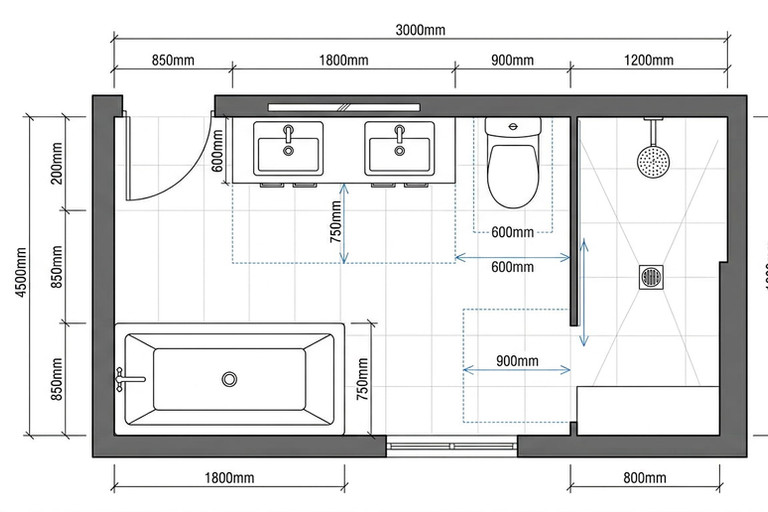
Un plano de diseño de baño dimensionado que muestra la colocación de accesorios y envolventes de espacio libre: la base del diseño profesional de baños.
¿Qué es un planificador de diseño de baños y por qué los arquitectos lo necesitan?
Cómo funciona un planificador de diseño de baños
Un planificador de diseño de baños es una herramienta de diseño digital que permite a arquitectos y diseñadores de interiores organizar accesorios, paredes, puertas y herrajes dentro de un plano de planta a escala antes de que comience la construcción. Los planificadores de nivel profesional típicamente admiten colocación de arrastrar y soltar, anotaciones de dimensiones automáticas, verificación de espacios libres basada en códigos y visualización 2D o 3D con exportación a formatos profesionales como DWG, PDF o Revit.
En esencia, el planificador funciona permitiéndole definir los límites de la habitación, importar o esbozar medidas tal como se construyeron, y luego posicionar inodoros, duchas, lavabos y zonas de almacenamiento en una cuadrícula de coordenadas. El software calcula los espacios libres en tiempo real y señala conflictos contra el perfil de código que selecciona.
Herramientas de consumidor frente a planificadores de diseño de baños de nivel profesional
Las aplicaciones de consumidor como planificadores de habitaciones gratuitos basados en navegador permiten a los propietarios arrastrar iconos de muebles genéricos a un lienzo en blanco. Rara vez cumplen los espacios libres mínimos, típicamente carecen de un motor de verificación de códigos y exportan solo imágenes rasterizadas o PDF de baja resolución.
Los planificadores de diseño de baños de nivel profesional difieren de varias formas críticas:
Verificación de espacios libres consciente de códigos contra IBC, ADA y enmiendas locales
Salidas dimensionadas con cronogramas de accesorios anotados
Exportación CAD y BIM en formatos DWG, RVT y SKP
Librerías de accesorios con especificaciones de rough-in reales de fabricantes
Funciones de colaboración para coordinación multidisciplinaria
¿Dónde se integra un planificador de distribuciones en el flujo de trabajo de documentación de diseño?
Un planificador de distribuciones de baños se sitúa entre el diseño esquemático inicial y la documentación de construcción. Durante los esquemáticos, te permite iterar rápidamente sobre disposiciones de accesorios. Una vez aprobado, el plano acotado se exporta directamente a tu entorno CAD o BIM para detalles. Para diseñadores que también manejan amueblamiento y estilo espacial, el planificador se integra naturalmente con flujos de trabajo más amplios de diseño de espacios impulsados por IA que van más allá del baño.
Esta posición significa que el planificador ayuda a reducir retrabajos aguas abajo. Los errores detectados durante la iteración del diseño —una línea de centro de inodoro demasiado cerca de una pared, un giro de puerta que interfiere con el tocador— se resuelven antes de que lleguen a los documentos de construcción, donde los cambios son mucho más costosos.

Conclusiones clave
Un planificador de distribuciones de baños diseñado para arquitectos debe ir más allá del arrastrar y soltar: necesita verificación de distancias consciente del código, resultados acotados y exportación a formatos profesionales como DWG y Revit.
Cada distribución de baño debe comenzar con ubicaciones de tuberías existentes y restricciones estructurales antes de la colocación de accesorios, no al revés.
Los requisitos de distancias del IBC y ADA difieren significativamente: los profesionales deben verificar ambos en cada proyecto, especialmente en trabajos multiunidad y comerciales.
La generación de distribuciones impulsada por IA funciona mejor como herramienta de iteración rápida que produce diseños candidatos para que el arquitecto los refine, no como reemplazo del juicio profesional.
Las plantillas de distribución descargables y acotadas (baño pequeño, suite principal, conforme a ADA, en L, cuarto húmedo) aceleran el diseño esquemático y reducen errores en presentaciones de clientes en fase inicial.
ArchiVinci combina generación de distribuciones impulsada por IA, alertas automáticas de conflictos de código y exportación a CAD y BIM con un clic en un único planificador de distribuciones de baños diseñado para arquitectos y diseñadores de interiores.

Cómo planificar un diseño de baño: flujo de trabajo paso a paso
El siguiente flujo de trabajo de ocho pasos refleja cómo los profesionales experimentados típicamente secuencian un plano de piso de baño - comenzando con restricciones fijas y terminando con una exportación lista para el cliente.
Paso 1: Recopilar medidas construidas y ubicaciones de fontanería existentes
Mida cada pared, nicho y persiana con precisión de un cuarto de pulgada. Documente las líneas centrales de drenaje existentes, las salidas de suministro y las ubicaciones de la pila de ventilación. Estos puntos de fontanería fijos dictan dónde pueden ubicarse los accesorios sin reencaminamiento costoso. Un medidor de distancia láser mejora la precisión sobre mediciones con cinta, especialmente en habitaciones con geometría irregular.
Paso 2: Identificar restricciones estructurales (muros de carga, apilamiento de paredes húmedas, vigas de piso)
Marque los muros de carga y la dirección de las vigas de piso en su plano. El apilamiento de paredes húmedas (alinear verticalmente paredes de fontanería entre pisos) reduce recorridos y costos de tuberías. Confirme el tamaño y la dirección de la viga antes de encaminar drenajes nuevos - una viga 2x8 limita la profundidad de muesca según la Sección R502.8 de la IRC y puede restringir opciones de pendiente de drenaje. Cuando dude, consulte a un ingeniero estructural antes de comprometerse con un diseño que requiera modificación de vigas.
Paso 3: Marcar el giro de puerta, posiciones de ventanas y rejillas de HVAC
Trace el arco completo de apertura de puerta (típicamente 90 grados) y alturas de antepecho de ventanas. Anote cualquier suministro de HVAC o rejilla de retorno que deba mantenerse sin obstrucciones. Estos elementos crean zonas de exclusión que limitan dónde pueden colocarse los accesorios y la carpintería.
Paso 4: Colocar el inodoro (verificar la distancia de preparación e inclinación de drenaje)
Posicione el inodoro primero porque está vinculado al drenaje más grande (típicamente de 3 o 4 pulgadas) y la distancia de preparación más rígida (usualmente 12 pulgadas desde la pared terminada hasta la línea central de drenaje, aunque algunos fabricantes ofrecen modelos de preparación de 10 y 14 pulgadas). En ArchiVinci, soltar un accesorio de inodoro verifica automáticamente la distancia de preparación contra la especificación del fabricante seleccionado e ilumina cualquier violación de autorización de línea central.
Paso 5: Colocar la ducha o bañera (ubicación de drenaje y autorización de umbral)
Alinee el drenaje de ducha o bañera con la fontanería existente o propuesta bajo el piso. Verifique la pendiente de drenaje mínima (típicamente 1/4 de pulgada por pie según la mayoría de códigos de fontanería) y la autorización de umbral para accesos accesibles. ArchiVinci marca pendiente insuficiente y conflictos de umbral en tiempo real mientras ajusta la posición del accesorio.
Paso 6: Agregar los Tocadores, Lavamanos y Zonas de Almacenamiento
Coloca el tocador en relación con las líneas de suministro y asegúrate de que el desagüe del lavamanos se conecte eficientemente a la columna de ventilación. Deja espacio para la apertura de puertas de gabinetes y tiradores de cajones. Las zonas de almacenamiento (botiquines, torres de toallas) ocupan el espacio de pared restante sin invadir las envolventes de espacio libre.
Paso 7: Verifica Todos los Espacios Libres Según los Requisitos IBC y ADA
Ejecuta una verificación completa de espacios libres antes de finalizar tu plan de distribución del baño. La Sección 1210 del IBC y la Sección 604 del ICC A117.1 definen las distancias mínimas para la línea central del inodoro hacia la pared, el espacio libre frontal de accesorios y el radio de giro accesible. El motor compatible con códigos de ArchiVinci te permite alternar entre perfiles y superficies estándar de IBC y ADA e identifica cualquier conflicto. Siempre verifica con la versión de código adoptada por tu jurisdicción, ya que las enmiendas locales pueden modificar estos mínimos.
Paso 8: Revisa en 3D, Anota y Exporta para Aprobación del Cliente
Cambia a la vista 3D para verificar líneas visuales, selecciones de materiales y sensación espacial. Anota dimensiones, números de modelo de accesorios y códigos de acabado. Exporta la distribución final como un PDF acotado para revisión del cliente o como un DWG para tu conjunto de documentos de construcción: ArchiVinci admite ambos con un solo clic.

Dimensiones Clave de Baños y Reglas de Espacios Libres que Todo Diseñador Debe Conocer
Los espacios libres conformes con códigos no son sugerencias opcionales, son mínimos aplicables que varían entre los requisitos estándar del IBC y los estándares más rigurosos de diseño accesible ADA. Esta sección consolida las cifras de dimensiones de baño que los profesionales consultan con más frecuencia en un único recurso fácil de escanear. Ten en cuenta que los valores a continuación reflejan ediciones de códigos comúnmente adoptadas; siempre verifica contra la edición de código específica adoptada en tu jurisdicción.
Dimensiones Mínimas de Sala para Medio Baño, Baño Completo y Suite Principal
Las siguientes son pautas ampliamente utilizadas para tamaños mínimos de baños en diseño residencial. Los mínimos reales dependen de la selección de accesorios, la dirección de apertura de la puerta y la edición de código que tu jurisdicción haya adoptado.
Medio baño (polvorín): Aproximadamente 3 ft × 6 ft (18 sq ft) para un inodoro y lavamanos pedestal
Baño completo: Aproximadamente 5 ft × 8 ft (40 sq ft) para un inodoro, bañera/ducha y tocador
Baño principal: Generalmente 8 ft x 10 ft o más grande (80+ sq ft) para doble lavamanos, ducha separada, bañera independiente y compartimento de inodoro cerrado
Distancias mínimas de despeje de accesorios: Inodoro, ducha, lavamanos y bañera
Las distancias de despeje que figuran a continuación se basan en la IBC 2021 y las Normas ADA para el diseño accesible. Los valores específicos pueden variar bajo ediciones de códigos anteriores o posteriores o enmiendas locales.
Línea central del inodoro a pared lateral u obstrucción: mínimo IBC 15 pulgadas; mínimo ADA 18 pulgadas (rango de 16 a 18 pulgadas según la configuración por ADA Standards Capítulo 6)
Espacio de piso libre frente al inodoro: mínimo IBC 21 pulgadas; mínimo ADA 48 pulgadas para acceso en silla de ruedas
Tamaño interior mínimo de ducha: IBC permite 30 x 30 pulgadas; la ducha de transferencia ADA requiere mínimo 36 x 36 pulgadas
Despeje frontal del lavamanos: mínimo IBC 21 pulgadas; ADA requiere espacio de piso libre de 30 x 48 pulgadas para acceso frontal
Despeje de bañera: mínimo IBC 21 pulgadas a lo largo del lado abierto; ADA requiere espacio de piso libre de 60 pulgadas a lo largo de toda la longitud de la bañera
Requisitos de diseño accesible y ADA para distribuciones de baños
Los baños accesibles deben cumplir con las Normas ADA para el diseño accesible (Capítulo 6) e ICC A117.1 Sección 604. Los requisitos clave incluyen un radio de giro de 60 pulgadas (o espacio de giro en forma de T), barras de agarre en el inodoro y en la ducha, y grifos accionados por palanca. En proyectos residenciales multiunitarios, un porcentaje de unidades debe cumplir con estos estándares según lo determinado por las regulaciones de accesibilidad federales, estatales y locales aplicables. La guía ilustrada de elementos de plomería de la Junta de Acceso de EE.UU. proporciona diagramas útiles para aplicar estos requisitos en la práctica.
Consideraciones de código de giro de puerta y egreso
Las puertas del baño deben proporcionar una abertura clara mínima de 32 pulgadas (ADA también requiere esto). Las puertas no deben girar hacia la zona de despeje requerida de ningún accesorio. En baños pequeños, considera puertas corredizas o puertas que se abren hacia afuera para preservar el área de piso utilizable.
Los códigos de egreso requieren que la puerta sea operable desde el interior sin conocimiento especial. Los cerrojos de privacidad deben ser liberables desde el exterior en emergencias. Consulte con su oficial de construcción local sobre cualquier requisito de herraje de puertas o egreso específico de la jurisdicción.
Tabla de Referencia Rápida - IBC y ADA en Paralelo
Dimensión | Mínimo IBC | Mínimo ADA |
|---|---|---|
Línea central del inodoro a la pared/obstrucción | 15 in | 18 in |
Espacio libre frente al inodoro | 21 in | 48 in |
Interior de ducha (mínimo) | 30 x 30 in | 36 x 36 in |
Espacio libre frente al tocador | 21 in | Piso despejado 30 x 48 in |
Espacio libre bañera (lado abierto) | 21 in | 60 in a lo largo de la bañera |
Ancho de apertura libre de puerta | 32 in | 32 in |
Radio de giro (silla de ruedas) | N/A | Diámetro 60 in |
Nota: Verifique siempre las enmiendas del código local. Las jurisdicciones pueden adoptar versiones modificadas del IBC o imponer requisitos más estrictos. Los valores anteriores se basan en ediciones comúnmente adoptadas y deben confirmarse con el código aplicable de su proyecto. ArchiVinci le permite seleccionar perfiles de código específicos de la jurisdicción para que las verificaciones de espacios libres reflejen la ubicación de su proyecto.

Tipos de diseño de baño y plantillas descargables por forma de habitación
Cada forma de habitación presenta un rompecabezas de diseño diferente. Los siguientes tipos de diseño de baño cubren las configuraciones más comunes que encuentran los arquitectos. Cada uno incluye una breve descripción, caso de uso ideal y consideraciones clave de diseño que puede aplicar en cualquier planificador de diseño de baño.
Diseño de baño pequeño (5 ft x 8 ft y menos)
El clásico diseño de baño 5x8 encaja una combinación de bañera/ducha estándar a lo largo de una pared de 5 pies, un inodoro junto a él y un único tocador frente a la puerta. Esta configuración maximiza la cantidad de accesorios en la huella más pequeña prácticamente viable. La restricción clave es mantener el espacio libre de 21 pulgadas al frente del inodoro y el tocador simultáneamente. La fontanería típicamente se concentra en una pared húmeda para minimizar las tuberías y reducir el costo de instalación.
Diseño de baño en forma de L
Un baño en forma de L ocurre cuando la habitación se envuelve alrededor de un armario, conducto o columna estructural. Esta forma crea una separación de zonas natural: accesorios húmedos (ducha y bañera) en una rama, accesorios secos (tocador e inodoro) en la otra. El desafío del diseño es asegurar que la ventilación adecuada llegue a la zona húmeda cerrada. El área mínima recomendada es aproximadamente de 55 a 65 pies cuadrados dependiendo de las proporciones de las ramas, aunque los requisitos reales dependen de la selección de accesorios y los espacios libres del código.
Diseño de baño principal y ensuite
Los baños principales ensuite típicamente comienzan alrededor de 80 pies cuadrados y cuentan con tocadores duales, una ducha de caminata independiente y a menudo una bañera exenta. La oportunidad de diseño es crear zonas distintas húmedas, secas y de aseo. Colocar el inodoro en un compartimento cerrado de inodoro (mínimo 30 x 60 pulgadas según IBC) añade privacidad. El apilamiento de pared húmeda con la cocina debajo mantiene los costos de fontanería manejables.
Diseño de baño accesible según ADA
Un baño accesible según ADA requiere un radio de giro en silla de ruedas mínimo de 60 pulgadas, una ducha de acceso o transferencia (mínimo 36 x 36 pulgadas) y barras de agarre en el inodoro y en la ducha. El tocador debe permitir espacio libre de rodillas para un acercamiento frontal en silla de ruedas. Estos requisitos típicamente demandan un tamaño de habitación mínimo de aproximadamente 8 x 8 pies, aunque la huella exacta depende de la geometría del diseño, la selección de accesorios y la colocación de la puerta. Verifique siempre los requisitos contra la guía del Capítulo 6 de la Junta de Acceso de EE.UU.
Diseño de baño tipo wet room y ducha sin desnivel
Un baño abierto elimina completamente el cerramiento de la ducha, tratando todo el piso como una zona húmeda impermeabilizada. La variante de ducha sin borde confina la pendiente a un área de ducha definida manteniendo un umbral plano para accesibilidad. Ambas requieren un piso con pendiente adecuada (típicamente una pendiente mínima de 1/4 de pulgada por pie hacia el drenaje) e impermeabilización completa con membrana. Los baños abiertos se especifican cada vez más en proyectos de envejecimiento en el lugar y diseño universal debido a su acceso sin barreras. Los detalles de impermeabilización deben seguir las especificaciones del fabricante y los requisitos del código de construcción aplicables para el sistema de membrana seleccionado.
Descargar Plantillas Gratis de Distribución de Baños (DWG, PDF, SKP)
ArchiVinci ofrece plantillas de distribución de baños acotadas y gratuitas en formatos DWG, PDF y SKP que cubren los cinco tipos de distribución anteriores. Cada plantilla incluye etiquetas de artefactos, dimensiones de líneas centrales y envolventes de espacio libre preestablecidas según los estándares del IBC. Descárgalas para acelerar tu próximo diseño esquemático o presentación al cliente.
Visita la biblioteca de plantillas de ArchiVinci para acceder al conjunto completo. Las plantillas están listas para importar en AutoCAD, SketchUp o cualquier visor de PDF. Revisa y ajusta todas las dimensiones según los requisitos de código específicos de tu proyecto antes de enviar para permiso.
Las Mejores Herramientas Planificadoras de Distribución de Baños para Arquitectos y Diseñadores de Interiores
Qué Buscar en un Planificador Profesional de Distribución de Baños
Antes de comparar herramientas, establece tus requisitos innegociables. Los arquitectos e diseñadores de interiores profesionales deben priorizar estas capacidades en un planificador de distribución de baños:
Verificación de espacios libres conforme a código: ¿la herramienta señala automáticamente las violaciones del IBC y ADA?
Resultados acotados: ¿puedes exportar un plano de piso anotado y a escala?
Exportación CAD y BIM: ¿es compatible de forma nativa con DWG, RVT o SKP?
Generación de distribuciones por IA: ¿puede proponer arreglos de artefactos que luego puedas refinar?
Profundidad de la biblioteca de artefactos: ¿incluye datos reales de espacios libres del fabricante?
Colaboración - ¿puedes compartir planos editables con consultores y clientes?
Comparación de características - ArchiVinci, MyArchitectAI, RoomSketcher, Planner5D, SmartDraw y SketchUp
La siguiente comparación refleja los conjuntos de características y precios disponibles públicamente a principios de 2026. Las características y precios pueden cambiar; verifica los detalles actuales en el sitio web de cada proveedor antes de tomar una decisión de compra.
Herramienta | Características de IA | Compatibilidad 2D/3D | Verificación de código | Formatos de exportación | Precios (aproximados) | Ideal para |
|---|---|---|---|---|---|---|
ArchiVinci | Generación de distribuciones por IA, alertas automáticas de espacios libres | 2D y 3D con cambio instantáneo | Perfiles de código IBC y ADA | DWG, PDF, RVT, SKP | Nivel gratuito; Pro desde $29/mes | Arquitectos y diseñadores de interiores que necesitan planos compatibles con código |
MyArchitectAI | Generador de diseño con IA | Enfoque en renderizado 3D | Limitado | PNG, PDF | Nivel gratuito; planes pagos varían | Renders de IA rápidos para visualización conceptual |
RoomSketcher | Ninguno | 2D y 3D | Ninguno | PDF, PNG | Nivel gratuito; Pro desde $49/año | Propietarios y agentes inmobiliarios |
Planner5D | Sugerencias de espacios con IA | 2D y 3D | Ninguno | PNG, PDF | Nivel gratuito; Premium desde $6.99/mes | Planificación DIY y moodboards para usuarios finales |
SmartDraw | Ninguno | Solo en 2D | Ninguno | DWG, PDF, SVG, Visio | Desde $10/mes | Diagramación y planos de planta 2D básicos |
SketchUp | A través de plugins de terceros | 3D primario; 2D mediante LayOut | Solo a través de plugins | SKP, DWG, PDF | Web gratuito; Pro $349/año | Modelado 3D con gran ecosistema de complementos |
Modelos de precios y licencias comparados
La mayoría de herramientas de consumidor ofrecen niveles gratuitos generosos pero limitan la resolución o formato de exportación. El nivel gratuito de ArchiVinci incluye planificación de distribuciones de baños en 2D y verificación de códigos, mientras que Pro desbloquea generación de IA, visualización 3D y exportación a DWG/RVT. SketchUp Pro requiere una tarifa anual más alta pero sirve un propósito de modelado más amplio más allá de baños. Para detalles completos sobre las opciones de planes de ArchiVinci, visita la página de precios. Los precios de todas las herramientas están sujetos a cambios; confirma las tarifas actuales directamente con cada proveedor.
Para empresas que manejan volumen de trabajo residencial, el precio por puesto es importante. ArchiVinci y SmartDraw ofrecen planes mensuales que escalan de manera más flexible que las licencias solo anuales.
Qué herramienta de planificación de baños se adapta a tu flujo de trabajo
Si tu prioridad es obtener rápidamente distribuciones de baños compatibles con códigos que se exporten directamente a un pipeline CAD o BIM, ArchiVinci es una excelente opción. Si ya trabajas extensamente dentro de SketchUp para todas tus tareas de modelado, su ecosistema de complementos puede aproximar resultados similares de verificación de códigos con configuración adicional. Herramientas de consumidor como RoomSketcher y Planner5D sirven bien a clientes propietarios para tableros de inspiración de autoservicio pero generalmente carecen de las características de precisión y cumplimiento de códigos que los profesionales requieren.

Planificador de distribuciones de baños de ArchiVinci: Características y tutorial
Esta sección guía a través de un caso de uso práctico: planificar un baño de huéspedes de 5x8 desde un lienzo en blanco hasta un PDF dimensionado y exportado usando el planificador de distribuciones de baños de ArchiVinci.
Generación de distribuciones con IA: ¿Cómo funciona?
Ingresa las dimensiones de tu sala, posición de la puerta y ubicación de la ventana. Selecciona los accesorios que necesitas (inodoro, bañera/ducha combinada, vanidad individual). Haz clic en Generar distribuciones. El motor de IA de ArchiVinci produce tres a cinco arreglos candidatos, respetando cada uno el perfil de distancias mínimas que seleccionaste. La generación típicamente se completa en segundos, aunque la velocidad depende de la complejidad de las restricciones.
Cada distribución candidata es completamente editable. Arrastra cualquier accesorio para ajustar su ubicación, y el motor de distancias mínimas recalcula en tiempo real. Esto te permite iterar rápidamente en lugar de redibujar desde cero, un ahorro de tiempo significativo durante la exploración esquemática inicial.
Verificación de distancias mínimas consciente de códigos y alertas de conflictos
ArchiVinci ejecuta verificaciones de cumplimiento contra el perfil de código seleccionado (estándar IBC, accesibilidad ADA o un conjunto de enmiendas locales personalizado). Cuando una instalación viola una distancia mínima, aparece un indicador de conflicto en rojo directamente en el plano con la cláusula de código específica referenciada.
Por ejemplo, si la línea central del inodoro se coloca a 14 pulgadas de la pared lateral (por debajo del mínimo IBC de 15 pulgadas), la alerta dice: "Clearance de línea central del inodoro - 14 in detectado, 15 in requerido según IBC 1210". Esta especificidad ayuda a eliminar la adivinanza y apoya diseños conformes a código desde la etapa más temprana del esquema. Como con cualquier herramienta automatizada, los diseñadores deben verificar los problemas señalados contra la edición de código específica adoptada por su jurisdicción.
Modos de Plano 2D y Visualización 3D
Alterna entre un plano 2D preciso (con cadenas de dimensiones, líneas de centro y patrones de sombreado) y una vista 3D renderizada (con texturas de materiales, iluminación y modelos de instalaciones). Los cambios realizados en cualquier modo se sincronizan automáticamente. La vista 2D es ideal para coordinación con contratistas, mientras que la vista 3D acelera la aprobación del cliente. Para decisiones de estilo interior más complejas, los diseñadores también pueden aplicar Style Transfer a renders interiores para probar diferentes direcciones estéticas sin recrear el modelo.
Opciones de Exportación: Compatibilidad con DWG, PDF, Revit y SketchUp
Cuando el diseño está finalizado, exporta con un clic. Los archivos DWG se integran en AutoCAD con capas pre-organizadas (instalaciones, dimensiones, envolventes de clearance). Las exportaciones a Revit incluyen instalaciones mapeadas a familias. Las exportaciones en PDF se renderizan a resolución de calidad de impresión con bloque de título opcional.
También se admite la exportación SKP de SketchUp para firmas que usan SketchUp como su entorno 3D principal.
Prueba el Planificador de Diseño de Baños ArchiVinci
¿Listo para planificar tu próximo diseño de baño? Prueba el planificador de ArchiVinci gratis - sin tarjeta de crédito requerida. Comienza con el generador de diseño con IA, verifica clearances contra IBC o ADA, y exporta un plano acotado en minutos.
¿Prefieres verlo en acción primero? Mira el video de demostración en la página de producto de ArchiVinci.
Planificación de Baños 2D vs. 3D: Elegir el Modo Correcto para tu Flujo de Trabajo
¿Cuándo el Planificación 2D de Baños es el Punto de Partida Correcto?
Iteración de esquemas - Los planos 2D son más rápidos de modificar cuando pruebas múltiples disposiciones de accesorios
Marcas de contratista - Los oficiales leen planos 2D dimensionados con más facilidad que renders 3D
Revisiones de código - La mayoría de los departamentos de construcción aceptan planos de planta 2D, no modelos 3D
Tamaño de archivo y velocidad - Los archivos 2D son más ligeros y se cargan más rápido durante sesiones de revisión colaborativa
¿Cuándo la visualización 3D convence al cliente más rápido?
Selección de materiales y acabados - Los clientes comprenden patrones de baldosas, colores de encimeras y estilos de accesorios de forma más inmediata en 3D
Comprensión espacial - Los no diseñadores a menudo tienen dificultades para leer planos 2D; un recorrido 3D reduce la confusión
Presentaciones de diseño - Las vistas 3D renderizadas crean una impresión pulida y profesional en las reuniones con clientes
Detección de conflictos - Las vistas 3D revelan problemas de línea de visión y proporción (por ejemplo, un espejo de tocador bloqueado por un giro de puerta) que los planos 2D pueden ocultar
¿Cómo ArchiVinci conecta diseño 2D y presentación 3D?
ArchiVinci no te obliga a elegir un modo. Alternar entre 2D y 3D significa que dibujas con la precisión de un plano de planta y presentas con la claridad de un modelo renderizado. Cada anotación de dimensión, colocación de accesorio y verificación de espacio libre se transfieren entre ambas vistas sin duplicación de esfuerzo.
Este flujo de trabajo de doble modo es especialmente valioso durante reuniones con clientes. Recorre el plano 2D para explicar las restricciones de código, luego cambia a 3D para mostrar cómo esas restricciones moldean la experiencia vivida del espacio. Cuando los clientes quieren explorar una dirección de interior completamente diferente, puedes modificar el diseño de la habitación con IA y previsualizar el cambio sin empezar de nuevo.
Planificación de diseño de baños con IA vs. manual
¿Cómo la generación de diseños con IA acelera el diseño de baños en etapas iniciales?
La generación de diseños con IA resuelve el problema de la página en blanco. Proporciona dimensiones de la habitación, requisitos de accesorios y un perfil de código, y devuelve múltiples distribuciones de baño viables en segundos. Esto es especialmente útil cuando exploras opciones para formas de habitación inusuales o dimensiones ajustadas, donde la iteración manual es lenta.
En un proyecto residencial típico, la generación con IA puede comprimir significativamente la fase de esquema de diseño, permitiendo al diseñador enfocarse en el refinamiento, selección de materiales y comunicación con el cliente.
Precisión y limitaciones de los planos de baño generados por IA
La IA maneja bien la geometría y el cumplimiento de distancias mínimas cuando recibe datos de entrada precisos. Respeta las distancias mínimas, evita conflictos de giro de puertas y optimiza las rutas de circulación. Sin embargo, no tiene en cuenta condiciones específicas del sitio que queden fuera de los datos proporcionados.
Proximidad de la columna de fontanería: la IA no detecta conflictos de fontanería bajo el piso a menos que especifiques dónde se encuentra la columna
Incógnitas estructurales: las condiciones ocultas (vigas deterioradas, materiales que contienen amianto) requieren evaluación profesional y no pueden inferirse de un plano
Preferencias del cliente: las prioridades subjetivas como "quiero que la ducha mire hacia la ventana" requieren anulación manual
Matices del código local: aunque ArchiVinci admite perfiles de jurisdicción, las enmiendas locales oscuras aún pueden necesitar verificación manual con el oficial de construcción local
Importante: Los diseños generados por IA siempre deben ser revisados por un arquitecto o ingeniero licenciado antes de avanzar a la documentación de construcción. La IA es una herramienta de productividad, no un profesional licenciado.
Planificación manual de diseño de baños: ¿Cuándo es más importante la experiencia?
La planificación manual es esencial cuando las condiciones del sitio son complejas o cuando la intención de diseño es altamente específica. Un arquitecto experimentado integra conocimientos que van más allá de la geometría: la sensación de un espacio, el juego de la luz a través de una ventana, la privacidad acústica entre un baño y un dormitorio adyacente, y las realidades prácticas de la secuencia de construcción. Estos factores son difíciles de cuantificar o replicar para cualquier sistema de IA actual.
Un enfoque híbrido: del borrador de IA al diseño final refinado por el arquitecto
El flujo de trabajo más productivo para muchos estudios combina ambos enfoques. Permite que la IA genere tres a cinco diseños candidatos, revísalos con tu criterio profesional, selecciona el punto de partida más sólido y refínalo manualmente. Este enfoque híbrido captura la rapidez de la automatización y el matiz de la experiencia. Refleja cómo los profesionales ya usan herramientas de diseño interior con IA para producir variaciones de concepto rápidas antes de definir una dirección final.
ArchiVinci se construye alrededor de este modelo híbrido. La IA propone opciones, el arquitecto toma las decisiones, y cada edición se verifica contra el código en tiempo real.
Errores comunes en diseños de baños y cómo evitarlos
Ignorar las ubicaciones de drenajes existentes y la proximidad de la columna de tuberías
El error: Diseñar el diseño del baño basándose solo en la estética, para luego descubrir que el drenaje del inodoro está muy lejos de la columna más cercana. Reubicar un drenaje de inodoro a través de una losa de concreto o sobre vigas de piso añade un costo significativo y riesgo de demora a cualquier proyecto.
La solución: Siempre comienza con las ubicaciones de tuberías existentes como restricciones fijas. En ArchiVinci, ingresa primero las posiciones de drenaje y columna, y la IA las respeta durante la generación del diseño.
Espacio insuficiente alrededor de la línea central del inodoro
El error: Colocar la línea central del inodoro a menos de 15 pulgadas de una pared lateral u obstrucción, violando el mínimo del IBC. Este es uno de los errores de distancia más comunes en baños ajustados y una razón frecuente de correcciones en revisión de planos.
La solución: Verifica la distancia de la línea central antes de bloquear el plano. El motor consciente del código de ArchiVinci señala esta violación con la referencia de código específica en el momento en que colocas la instalación.
Pasar por alto los requisitos de ADA en proyectos de múltiples unidades o comerciales
El error: Diseñar todos los baños con los espacios libres estándar del IBC sin considerar las unidades conformes con ADA requeridas en edificios multifamiliares o comerciales. Este error suele detectarse tarde durante la revisión de planos, forzando rediseños costosos que se hubieran evitado.
La solución: Identificar qué unidades requieren cumplimiento con ADA en la fase de programación. Cambiar el perfil de código de ArchiVinci a ADA para esas unidades para que cada espacio libre se verifique contra el estándar más riguroso desde el inicio. Colaborar con tu consultor de códigos para confirmar la cantidad requerida y distribución de unidades accesibles.
Conflictos del Giro de Puerta con Accesorios de Baño
El error: Una puerta de baño que gira hacia adentro y golpea el inodoro, la vanidad o el umbral de la ducha. Más allá de ser un posible problema de código (las puertas no deben obstruir los espacios libres requeridos), crea una experiencia frustrante diaria para el ocupante.
La solución: Dibujar el arco completo del giro de la puerta en el plano. Considerar puertas corredizas o giros hacia afuera en diseños ajustados. ArchiVinci dibuja el arco de giro automáticamente e identifica cualquier solapamiento con accesorios.
Colocación Deficiente de Ventilación Respecto a Zonas de Humedad
El error: Colocar el ventilador de extracción lejos de la fuente primaria de humedad (la ducha) o directamente sobre el inodoro donde es menos efectivo para eliminar el vapor de la ducha. La extracción inadecuada acelera el crecimiento de moho y puede generar daños por humedad a lo largo del tiempo.
La solución: Posicionar el ventilador de extracción encima o inmediatamente adyacente a la ducha. ASHRAE Standard 62.2 proporciona directrices de velocidad de ventilación para baños residenciales según el volumen de la sala y patrones de uso. Marcar ubicaciones del ventilador durante la planificación del diseño, no como una ocurrencia tardía durante la coordinación eléctrica.
Cómo Exportar y Compartir tu Plano de Distribución de Baño
Formatos de Exportación Recomendados para Documentos de Construcción vs. Presentaciones a Clientes
Diferentes audiencias necesitan diferentes entregables de un planificador de distribución de baño. Para entrega al contratista, exportar un archivo DWG dimensionado con capas organizadas por tipo de accesorio, cadenas de dimensión y envolventes de espacios libres. Para aprobación del cliente, un PDF renderizado o enlace 3D interactivo comunica la intención del diseño más claramente que un dibujo técnico.
ArchiVinci te permite exportar ambos desde el mismo archivo de proyecto. La exportación a DWG preserva las capas de CAD, mientras que la exportación a PDF incluye un bloque de título pulido y un render 3D opcional en una segunda página.
Anotación de dimensiones y especificaciones de accesorios para entrega al contratista
Todo plano de baño a nivel de construcción debe incluir:
Dimensiones generales de la sala y medidas de pared a pared
Líneas centrales de accesorios para inodoro, desagüe de lavamanos y desagüe de ducha
Distancias de preparación desde paredes terminadas
Envolventes de espacio libre dibujados como contornos punteados
Tabla de accesorios que referencia fabricante, modelo y acabado
ArchiVinci genera automáticamente cadenas de dimensión y una tabla de programa de accesorios que se exportan junto con el plano de planta. También puedes usar la herramienta de coloreado de planos de IA para añadir rellenos de sombreado de materiales y sombreado de zonas al plano exportado para una comunicación más clara con el contratista.
Compartición de recorridos 3D interactivos con clientes
Los PDF estáticos funcionan, pero un recorrido 3D interactivo permite a los clientes explorar el baño desde cualquier ángulo, ampliar detalles de materiales y sentir las proporciones espaciales. ArchiVinci genera un enlace en la nube compartible a un modelo 3D interactivo. Los clientes lo abren en cualquier navegador moderno sin necesidad de instalación de software.
Esta capacidad puede reducir ciclos de revisión. Los clientes detectan sus propias preocupaciones —"No me había dado cuenta de que la puerta de la ducha se abriría hacia el tocador"— antes de que el plano llegue a los documentos de construcción, donde los cambios son significativamente más costosos de implementar.
Preguntas frecuentes
¿Cuál es el mejor planificador de diseño de baños gratuito para arquitectos?
El mejor planificador de distribución de baños gratuito para arquitectos es uno que incluye verificación de distancias conforme a código y formatos de exportación profesional. ArchiVinci ofrece un nivel gratuito con planificación en 2D, verificaciones de distancias IBC y exportación a PDF. SketchUp Free proporciona modelado en 3D pero carece de verificación de código integrada. Para flujos de trabajo profesionales, priorice herramientas que generen archivos DWG e identifiquen automáticamente violaciones de distancias. Evalúe cualquier herramienta gratuita contra sus necesidades específicas del proyecto antes de comprometerse con un flujo de trabajo.
¿Existe una aplicación para planificar la distribución de un baño en el sitio?
Sí, varias aplicaciones permiten planificar la distribución de baños en el sitio desde una tableta o teléfono. ArchiVinci se ejecuta en un navegador en la mayoría de dispositivos modernos, permitiéndole ingresar medidas tal como se encuentran y generar distribuciones directamente en el sitio. Las aplicaciones móviles dedicadas como Planner5D también ofrecen dibujo de habitaciones basado en táctil. Para obtener los mejores resultados, combine la aplicación con un medidor de distancia láser para capturar dimensiones precisas de la habitación y verificar las medidas antes de abandonar el sitio.
¿Puede la IA diseñar una distribución de baño lo suficientemente precisa para la construcción?
La IA puede generar distribuciones de baños que cumplan con distancias de código y respeten restricciones dimensionales a un nivel generalmente adecuado para la exploración de diseño esquemático. Sin embargo, los planos generados por IA siempre deben ser revisados y validados por un arquitecto o ingeniero licenciado antes de avanzar hacia documentación de construcción. Las condiciones específicas del sitio —pilas de fontanería ocultas, estructura deteriorada, enmiendas de código local y necesidades únicas del cliente— requieren criterio profesional que la IA no puede replicar.
¿Cuáles son las dimensiones mínimas de un baño completo?
Las dimensiones mínimas para un baño completo estándar (que contiene inodoro, lavabo y bañera o ducha) son aproximadamente 5 pies por 8 pies, o 40 pies cuadrados, según la práctica común de diseño residencial. Esto asume una bañera estándar a lo largo de la pared de 5 pies y permite la distancia mínima de 21 pulgadas del IBC al frente para el inodoro y el lavabo. Los baños completos que cumplen con ADA requieren significativamente más espacio para acomodar el radio de giro de silla de ruedas y las distancias de accesorios accesibles. Siempre verifique las dimensiones mínimas contra la versión del código adoptado en su jurisdicción local.
¿Cuáles son los requisitos de distribución de baño ADA?
Los requisitos de distribución de baño ADA, según se definen en los ADA Standards for Accessible Design Capítulo 6 e ICC A117.1 Sección 604, incluyen un radio de giro de silla de ruedas de 60 pulgadas (o espacio de giro en forma de T), una ducha de transferencia mínima de 36 x 36 pulgadas, barras de agarre en el inodoro y la ducha, una apertura de puerta clara mínima de 32 pulgadas, y espacio libre de rodillas bajo el lavabo. Los proyectos residenciales de múltiples unidades y comerciales deben cumplir con estos requisitos para un porcentaje específico de unidades según lo determine la regulación federal, estatal y local aplicable.
¿Cómo distribuir un baño pequeño de 5x8?
Para distribuir un baño pequeño de 5x8, coloque la bañera o combo de ducha a lo largo de la pared de 5 pies opuesta a la puerta. Posicione el inodoro junto a la bañera con su línea central a al menos 15 pulgadas de la pared lateral según los requisitos del IBC. Coloque el lavabo en la pared opuesta al inodoro. Concentre toda la fontanería en una pared húmeda para minimizar tramos de tuberías y reducir costos. Verifique que se mantenga la distancia mínima de 21 pulgadas al frente para cada accesorio, y verifique las enmiendas del código local que puedan imponer requisitos adicionales.
¿Qué viene primero al planificar un baño, la fontanería o la distribución?
Las ubicaciones de plomería deben identificarse y documentarse antes de finalizar el diseño. Las líneas de drenaje existentes, las conexiones de suministro y las posiciones de las pilas de ventilación son típicamente los elementos más costosos de reubicar. Comience registrando estos puntos de plomería fijos durante el levantamiento as-built, luego diseñe la distribución de accesorios alrededor de ellos. Este enfoque de plomería primero ayuda a prevenir el rerrutamiento costoso durante la construcción.
¿Puede mover la plomería al rediseñar un baño?
Sí, la plomería se puede mover durante un rediseño de baño, pero el costo y la complejidad varían significativamente según el alcance del movimiento. Reubicar las líneas de suministro es relativamente sencillo. Mover las líneas de drenaje es más complejo porque los drenajes requieren la pendiente adecuada (típicamente 1/4 de pulgada por pie como mínimo según la mayoría de los códigos de plomería) y proximidad a una pila de ventilación. Mover un drenaje de inodoro a través de una losa de concreto es generalmente el escenario más costoso. Siempre haga que un plomero certificado evalúe las condiciones existentes antes de comprometerse con un nuevo diseño que requiera reubicación de drenaje.
¿Cuál es la diferencia entre un planificador de baño 2D y 3D?
Un planificador de baño 2D produce un plano de planta plano visto desde arriba con dimensiones, contornos de accesorios y zonas de espacio libre. Un planificador 3D añade altura, materiales y visualización renderizada para que pueda ver el espacio a nivel de los ojos. Los profesionales típicamente utilizan 2D para verificación de cumplimiento de códigos y documentación para contratistas, y 3D para presentaciones a clientes y selección de materiales. Herramientas como ArchiVinci ofrecen ambos modos con la capacidad de alternar entre ellos.