Image to Render
Turn any Image into a Photorealistic Render
Turn any reference image into a photorealistic architectural render in seconds. Upload photos, CAD export images, or 3D model screenshots and generate presentation-ready visuals with ArchiVinci.
No learning curve
No GPU needed
No installation needed
From Architectural Image to Photorealistic Render
Create realistic architectural renders from any image in seconds. Explore materials, lighting, and design concepts with confidence.
Upload an existing architectural photo and transform it into a new design direction. Change interior elements, test exterior updates, and explore renovation ideas while keeping the original space as your foundation.
1. Edit the Design in Your Photo
Use one image-based workflow to redesign rooms, add furniture, restyle interiors, apply new façade colors and materials, or visualize landscape ideas for gardens and outdoor areas.
2. Redesign Interiors, Exteriors, and Outdoor Spaces
Turn photos into photorealistic renders with realistic materials, lighting, textures, and atmosphere. Compare different styles, furniture layouts, façade treatments, and landscape concepts before making decisions.
3. Explore Realistic Design Options
Skip complex modeling and rendering workflows. Start with a photo and generate high-quality architectural visualizations in around 10 seconds to test ideas faster and present them more clearly.
4. Visualize Changes in Seconds
ArchiVinci's Image to Render Workflow in Action
From the original image to the final render, discover how ArchiVinci brings architectural ideas to life.
Existing Room Photo to Interior Redesign

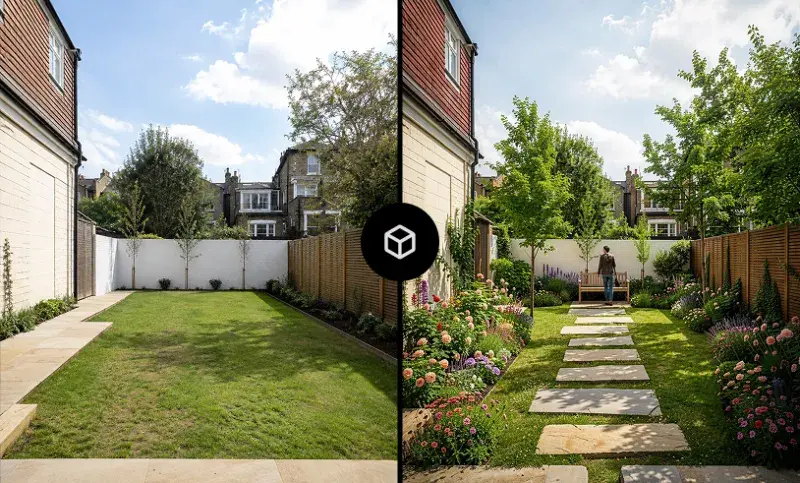
Garden Photo to Landscape Render
Exterior Building Photo to Facade Redesign

Existing Space Photo to 2D Survey Drawing

Turn Any Image into a Photorealistic Architectural Render in 3 Simple Steps
Follow a simple image to render workflow to transform your architectural images into photorealistic renders with AI.

Step 1
Upload Your Image
Upload your architectural image in JPEG, PNG, or WEBP format to start the image to render workflow.
Step 2
Customize Your Render
Adjust styles, materials, lighting, and prompts to personalize the AI image rendering process.
Step 3
Create & Iterate
Generate multiple architectural renders from your image, compare variations, and refine the result that best matches your vision.
More Ways to Use Architectural Photos with AI
A photo can be more than a reference. Use it as the foundation for redesigning, furnishing, sketching, visualizing, and developing architectural ideas.
Upload an existing room photo and replace furniture, finishes, decor, materials, or individual objects without recreating the space from scratch.
Change Furniture and Interior Elements

Use an existing building photo to test new façade treatments, materials, colors, windows, landscaping, and architectural interventions.
Visualize Facade and Exterior Changes

Turn a photo of an empty or unfinished space into a fully furnished interior and explore different layouts, styles, and furniture combinations.
Furnish an Empty Room

Transform the same photo with different daylight conditions, artificial lighting, moods, and visual atmospheres to compare design directions.
Explore Lighting and Atmosphere

Draw new architectural or interior design ideas directly over a photo, then transform your sketch additions into a realistic render that blends with the existing space.
Sketch Over a Photo and Render It

Use photos of existing spaces as visual references when developing simplified 2D architectural drawings, measured-survey concepts, layouts, and early design documentation.
Develop 2D Drawings from Existing Spaces

Who Uses Photo to Render?
Turn an existing photo into a starting point for design. From homeowners exploring renovations to designers testing new ideas, ArchiVinci helps you visualize changes before making them real.
Upload a photo of your room and explore new interior styles, materials, colors, furniture, and layouts before starting a renovation.
Homeowners Planning a Makeover
Start with a photo of an existing outdoor space and visualize new landscaping, planting, pathways, furniture, and garden layouts.
Landscape & Garden Designers
Use existing room photos to test furniture, finishes, lighting, and design directions while keeping the original space as your visual reference.
Architects & Interior Designers
Use existing property photos to create more attractive visuals. Restyle interiors, furnish empty spaces, and help buyers imagine a property’s full potential more clearly.
Real Estate Professionals
Ready to Transform Images into Stunning Architectural Renders?
With ArchiVinci, your next photorealistic architectural render is just one image away. Get started with your first 3 free renders.


Frequently Asked Questions
What is an image to render workflow?
An image to render workflow is the process of transforming an existing architectural image into a photorealistic render using AI. This image can be an interior photo, exterior photo, garden image, real estate photo, CAD export image, sketch, or 3D model screenshot.
How does ArchiVinci’s image to render workflow work?
ArchiVinci’s image to render workflow lets you upload an architectural image and transform it into a photorealistic render in seconds. Simply upload your image, describe the changes you want with prompts, adjust style, materials, lighting, or additional elements, and generate multiple render variations.
Can I use image to render for existing photos?
Yes. ArchiVinci’s image to render workflow works with existing photos, allowing you to transform interior, exterior, landscape, and property images into presentation-ready architectural renders.
Can I redesign a room with image to render?
Yes. You can use image to render to redesign an existing room photo by testing new interior styles, furniture, materials, colors, finishes, and decorative elements while keeping the original space as your visual base.
Can I add furniture to a room with image to render?
Yes. ArchiVinci’s image to render workflow can be used to furnish empty or partially furnished room photos, making it useful for interior design, virtual staging, renovation planning, and real estate presentations.
Can I change furniture or materials in an existing image?
Yes. With image to render, you can upload an existing room image and explore new furniture, flooring, wall finishes, colors, surface materials, and other interior changes without recreating the space in 3D.
Can I redesign a building facade with image to render?
Yes. Image to render can transform exterior building photos into realistic façade visualizations, helping you test new materials, colors, finishes, architectural details, entrances, and renovation ideas.
Can I create landscape concepts with image to render?
Yes. You can use image to render for gardens, terraces, yards, and outdoor areas by uploading an existing photo and visualizing planting, pathways, outdoor furniture, hardscape, and landscape design ideas.
Can I test lighting changes with image to render?
Yes. ArchiVinci’s image to render workflow allows you to explore different lighting conditions, moods, daylight scenarios, and atmospheres directly from an existing image.
Who can use image to render?
Architects, interior designers, landscape designers, real estate professionals, and homeowners can all use image to render workflows to explore design ideas and create realistic architectural visuals faster.
What types of images can I use for image to render?
You can use many types of architectural images for image to render, including interior photos, exterior photos, garden and landscape photos, real estate images, CAD export images, sketches, and 3D model screenshots.
What image formats does ArchiVinci support?
ArchiVinci supports common image formats including JPEG, PNG, and WEBP, making it easy to start any image to render workflow.
How photorealistic are image to render results?
ArchiVinci creates photorealistic image to render outputs with realistic materials, lighting, textures, and details suitable for presentations, design exploration, and client communication.
How long does image to render take?
ArchiVinci can complete an image to render generation in seconds, helping you visualize design changes much faster than traditional rendering workflows.
Do I need a 3D model for image to render?
No. One of the main advantages of image to render is that you can start directly from an existing image, without building a full 3D model first.