Render generation is only available on desktop
Our rendering tools are available on desktop only. Sign in now to access your account, then continue creating and editing your renders when you’re on desktop.

Open to download
IN PROGRESS...
Have a coffee break while we are proccessing your video
or you can continue generating renders
You'll find this video in your DASHBOARD when it's ready
(about 10 mins)
Upscale 4x
Variation
Edit image
Animate image
See image

Add paragraph text. Click “Edit Text” to customize this theme across your site. You can update and reuse text themes.
Precise Visualizer
• Upload a finalized 3D model screenshot.
• Adjust texture balance for exactness or texture quality.
• Write a prompt to describe your scene.
• Choose an interior or exterior space.

Input image*
Texture balance*
EXACT
REALISTIC
Adjust this slider to find the perfect balance for your design.
Exact: Keeps the design closer to your original input, but with less realistic texture.
Realistic: Enhances texture for a more lifelike look, but may differ from your original input.
Render engine*
Long prompts may lead to unexpected results. Keep it short for best results. Here is some tips about prompts: Learn more
Render space*
Render space type*
Number of images*
Error
Precise Visualizer for Consistent Architectural Outputs
Precise Visualizer helps refine existing architectural inputs without shifting the source structure, camera angle, or visible design details.
What Is Precise Visualizer?
Precise Visualizer is an architectural visualization module that creates high fidelity outputs from existing design inputs while preserving source geometry, layout, camera angle, material relationships, textures, and visible design details.
It is used for sketches, model screenshots, draft visuals, and design images where the original design structure should remain consistent in the final output.
How Does Precise Visualizer Work?
Precise Visualizer uses the uploaded image as the reference for structure, perspective, and material relationships.
The workflow interprets visible geometry, camera angle, depth, openings, surfaces, lighting direction, and material zones. It then creates a high fidelity output while keeping the main architectural relationships close to the source image.
How Does It Work with Model Screenshots?
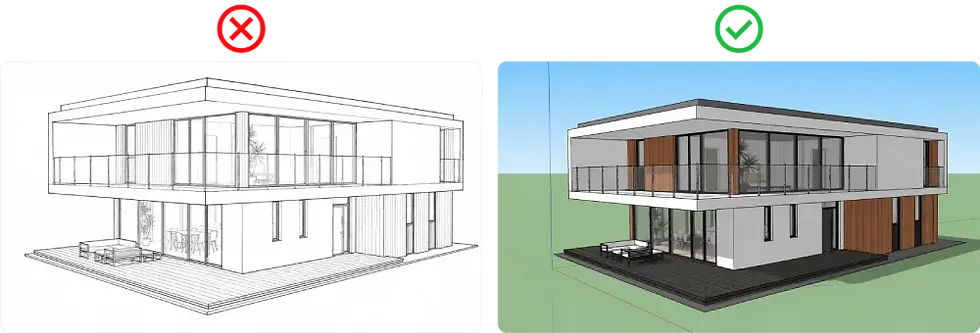
A 3D model screenshot can be used as the starting point for Precise Visualizer.
The module turns the model view into a realistic architectural visual while keeping the same massing, openings, perspective, surfaces, and overall composition. This is useful when a raw model screenshot already shows the right design structure, but needs a more realistic visual appearance without rebuilding the scene manually.
How Does Precise Visualizer Keep the Source Image Stable?

Precise Visualizer uses the input image as the main reference for composition and structure.
It keeps the camera position, perspective, geometry, spatial relationships, and visible architectural elements close to the original image. This helps reduce unwanted changes such as shifted openings, altered rooflines, changed proportions, or modified spatial layouts.
How Does Precise Visualizer Handle Lighting and Shadows?

Precise Visualizer follows the lighting logic visible in the source image.
It interprets light direction, shadow placement, contrast, and brightness relationships from the input. The workflow does not physically simulate lighting, but it aims to keep the output visually consistent with the original light conditions.
How Does Precise Visualizer Improve Detail Clarity?

Precise Visualizer can improve the visual clarity of surfaces, edges, textures, and architectural details.
This may include clearer material definition, reduced visual noise, sharper surface transitions, and more readable design elements. The level of improvement depends on the quality, resolution, and clarity of the source image.
What Is Exact vs Realistic Texture Balance?
Exact texture balance keeps the output closer to the source image. Realistic texture balance allows more visual interpretation while still following the source structure.
Setting | Suitable For | Expected Result |
|---|---|---|
Exact | Geometry sensitive projects, material checks, design reviews | Output remains closer to the original input |
Balanced | Interior studies, facade studies, project previews | Output keeps source structure while increasing visual realism |
Realistic | Visual communication and project presentation | Output allows more realism while still following the source |
Use a more exact setting when material placement, texture direction, and design details must stay close to the input. Use a more realistic setting when visual realism is more important than strict texture matching.
What Does Precise Visualizer Preserve?
Precise Visualizer focuses on preserving the design elements that define the source image.
It helps maintain architectural geometry, spatial layout, camera angle, perspective, proportions, opening positions, facade rhythm, interior structure, material direction, texture continuity, and visible design details.
This is useful when the output should remain recognizable as the same project.
What Does Geometry Fidelity Mean?
Geometry fidelity means that the building form, room structure, openings, proportions, and architectural relationships remain close to the source image.
In architectural visualization, small geometry changes can affect design accuracy. A shifted window, distorted wall, changed ceiling line, altered facade rhythm, or incorrect room depth can make the output inconsistent with the original project.
What Does Material Fidelity Mean?
Material fidelity means that the output follows the material logic of the source image.
Wood, concrete, stone, glass, plaster, fabric, metal, and facade surfaces should remain visually connected to the original design. The output may increase visual realism, but the material direction, texture scale, and surface relationships should remain consistent with the input.
When Should You Use the Precise Visualizer?
Use Precise Visualizer when the source image already contains the design information that must be preserved.
It is suitable for workflows where accuracy, source consistency, and controlled visual output are more important than open ended design exploration.
For interior images, Precise Visualizer is most useful when the room layout, furniture position, and camera angle already need to stay consistent. If the project starts with broader room concept creation or interior style exploration, use AI interior design visualization before refining the selected image with Precise Visualizer.
For facade and exterior inputs, Precise Visualizer works best when the building form, viewpoint, openings, and material direction should remain close to the source. If the project starts with exterior concept creation or facade design exploration, use AI exterior design visualization first, then use Precise Visualizer for a more source consistent output.
Use Case | Why It Fits |
|---|---|
3D model screenshots | Maintains massing, openings, perspective, and structure when the model view already shows the right design direction. Useful for turning raw model screenshots into realistic visuals without rebuilding the scene manually. |
Draft architectural visuals | Increases visual realism while keeping the same design direction, layout, camera angle, and main proportions. Useful when a draft visual already communicates the project structure but needs clearer visual definition. |
Interior concept images | Preserves room layout, furniture position, and camera angle when the interior concept already needs to stay consistent. For broader room style exploration, use AI interior design visualization first, then refine the selected image with Precise Visualizer. |
Exterior concept or facade studies | Maintains building form, viewpoint, openings, facade rhythm, surface logic, and material relationships. For exterior concept or facade exploration, use AI exterior design visualization first, then refine the selected image with Precise Visualizer. |
Material comparisons | Keeps the same base design, camera angle, and composition while reviewing different material appearances, texture directions, or surface finishes. Useful when the design should remain stable but the visual material result needs to be tested. |
Design review visuals | Supports review workflows by keeping spatial relationships, proportions, camera angle, and key design details close to the source image. Useful when the output needs to communicate the existing design without changing its structure. |
When Is Precise Visualizer Not the Right Choice?
Precise Visualizer is not the right workflow when the goal is to create a different design direction.
If the goal is to change the layout, redesign the facade, adjust the composition, or test a different spatial concept, a variation based workflow will be more suitable. Precise Visualizer works best when the original image should stay structurally important in the final output.
What Makes Precise Visualizer Different from Variation Based Visualization?
Precise Visualizer preserves the original image as the main reference, keeping geometry, layout, camera angle, materials, textures, and key details close to the source. Variation based visualization is better for exploring new styles or alternative design directions.
In short, Precise Visualizer refines what exists, while variation based visualization explores what it could become.
Comparison Point | Precise Visualizer | Variation Based Visualization |
|---|---|---|
Main goal | Preserve the source input | Explore alternative design outputs |
Geometry | Remains close to the source | Can change depending on the prompt |
Camera angle | Stays close to the input | Can be reinterpreted |
Materials | Follows source material logic | Can be replaced or modified |
Suitable use | Accuracy, review, project consistency | Concept exploration and visual alternatives |
Use Precise Visualizer when the source image must remain structurally important. Use variation based visualization when the design direction is still open.
Can Precise Visualizer Be Used for Iterative Design Reviews?
Yes. Precise Visualizer can be applied to the same source image more than once when different levels of realism, material interpretation, or texture balance need to be reviewed.
The main viewpoint and structure should remain close to the source, which makes the workflow suitable for comparing controlled visual outputs from the same design input.
Who Should Use Precise Visualizer?
Precise Visualizer is suitable for users who need realistic architectural outputs without changing the source design structure. It can be used by architects, interior designers, real estate visualizers, design studios, 3D artists, furniture designers, and project teams that work with sketches, model screenshots, draft visuals, or design images.
Key Functions of Precise Visualizer
Precise Visualizer supports controlled visual output from existing design inputs.
Main functions include:
-
Preserving source geometry
-
Maintaining layout and camera angle
-
Keeping material direction consistent
-
Supporting texture continuity
-
Following visible lighting and shadow logic
-
Improving surface and edge clarity
-
Supporting iterative review from the same source image
-
Keeping output visually connected to the original input
Frequently Asked Questions
What Is Precise Rendering?
Precise rendering is a source consistent visualization method that creates high fidelity architectural outputs from existing inputs while preserving geometry, layout, camera angle, materials, textures, and visible design details.
Does Precise Visualizer create different camera angles?
No. Precise Visualizer is designed to keep the original camera angle close to the input. Use a different angle generation workflow when a new viewpoint is needed.
Can Precise Visualizer use CAD files or floor plans directly?
No. Precise Visualizer works with image based inputs such as sketches, model screenshots, draft visuals, and design images. CAD files or floor plans should first be converted into a suitable visual input.
What input images work best with Precise Visualizer?
Clear sketches, high resolution model screenshots, draft visuals, and design images work best. The input should show readable geometry, perspective, lighting, and material direction.
Does Precise Visualizer change the layout?
Precise Visualizer is intended to keep the layout close to the source image. It may improve visual realism, but spatial organization, object placement, and camera angle should remain consistent.
How does Precise Visualizer preserve geometry?
It uses the input image as the structural reference. Main proportions, openings, surfaces, and architectural relationships are kept close to the source to reduce unwanted geometry changes.
How does Precise Visualizer handle materials and textures?
It follows the material logic visible in the source image. Material direction, surface relationships, texture scale, and texture continuity are preserved as much as the input allows.
Can Precise Visualizer preserve custom textures or unique finishes?
Yes, when they are clearly visible in the source image. Very small, unclear, or highly specific surface details may need additional refinement after the first output.
Does image resolution affect the result?
Yes. Higher resolution inputs usually provide more information for geometry, material, texture, and lighting interpretation. Low resolution inputs may reduce detail clarity and output consistency.
What happens if the source image has missing or unclear geometry?
Precise Visualizer works best when the main structure is visible. If important parts of the design are missing or unclear, the output may also remain visually uncertain in those areas.
Can Precise Visualizer refine AI generated design images?
Yes. It can be used with AI generated design images when the goal is to improve realism while keeping the original structure recognizable.
Is Precise Visualizer better for accuracy or design exploration?
Precise Visualizer is mainly for accuracy and source consistency. It is better for preserving an existing design input than for creating alternative design directions.
Can the output be edited further?
Yes. The output can be refined in image editing, design, or presentation software for annotation, compositing, material notes, or final adjustments.
You don't have enough credits.
Buy a plan to continue rendering