Render generation is only available on desktop
Our rendering tools are available on desktop only. Sign in now to access your account, then continue creating and editing your renders when you’re on desktop.

Open to download
IN PROGRESS...
Have a coffee break while we are proccessing your video
or you can continue generating renders
You'll find this video in your DASHBOARD when it's ready
(about 10 mins)
Upscale 4x
Variation
Edit image
Animate image
See image

Add paragraph text. Click “Edit Text” to customize this theme across your site. You can update and reuse text themes.
Dream Space AI
• Write a prompt defining your dream space's design features (e.g., 'Beach house with large windows, tropical climate, light blue ocean').
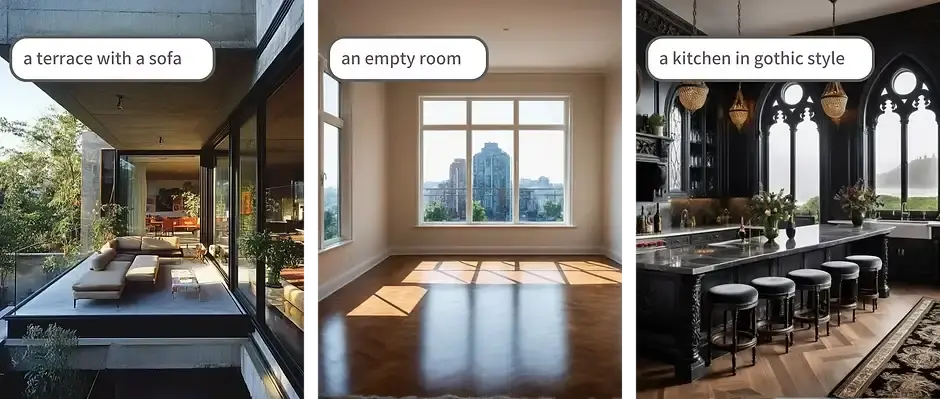
Long prompts may lead to unexpected results. Keep it short for best results. Here is some tips about prompts: Learn more
Negative prompt
(optional)
Number of images*
Error
Dream Space Generator: Turn Your Imagination into Architectural Visuals
Describe the space you imagine and turn it into an architectural visual. Dream Space AI helps you explore interior, exterior, landscape, and spatial concepts from written prompts for early-stage ideation, mood studies, and design exploration.
Visual Examples of Dream Space AI with ArchiVinci
Modern Hotel Concept with Dream Space AI

Dream Space AI helps turn modern hospitality ideas into clear architectural visuals, from exterior concepts to interior room atmospheres. This image shows how a luxury hotel or villa concept can be explored with glass façades, warm lighting, a poolside setting, and a calm bedroom interior. It is useful for visualizing both the building’s first impression and the guest experience inside.
Natural Architecture with Dream Space AI

Dream Space AI can be used to explore natural architectural styles that feel warm, timeless, and livable. This concept combines a Mediterranean courtyard with arches, terracotta flooring, greenery, and a bright modern living room filled with plants and soft neutral tones. It is ideal for imagining peaceful residential spaces connected to nature.
Organic Curved Design with Dream Space AI

Dream Space AI makes it easier to visualize bold architectural ideas with organic forms and dramatic interiors. This image presents a curved desert retreat integrated into a rocky landscape, paired with a luxury interior featuring panoramic windows, circular ceiling lighting, and sleek modern finishes. It shows how imaginative spatial ideas can become realistic visual concepts.
What Is a Dream Space AI?
A Dream Space Generator is a prompt-based architectural visualization tool that turns written space ideas into visual concepts. Users describe what they imagine, and the system creates an architectural image based on that description.
A prompt may include the space type, design style, material palette, lighting condition, landscape context, mood, and elements that should be excluded. The result is a visual interpretation of the imagined space.
For example, a user can describe a tropical beach house with large windows, natural wood, soft daylight, and a light blue ocean view. The tool turns that written idea into an architectural visual that can be used for design exploration, mood studies, or early concept communication.
How Does the Dream Space AI Work?
Dream Space Generator follows a simple prompt-based workflow. Users describe the space they imagine, define the visual direction, add design details, use exclusions if needed, select the number of images, and generate architectural visuals.
Write Your Design Description
Start by writing the space you imagine as a prompt. The prompt can be short, descriptive, or detailed depending on how specific the result should be.
A simple prompt may describe a calm courtyard, a warm living room, or a modern house in nature. A detailed prompt can include the space type, style, materials, colors, lighting, climate, view, landscape, and atmosphere. The clearer the prompt, the easier it becomes to translate the imagined idea into a useful visual concept.
Describe the Space Type in Your Prompt
The prompt should define what kind of space you want to explore. It can be an interior, exterior, landscape, terrace, garden, façade, courtyard, pool area, rooftop, café, villa, or any other architectural environment.
This makes the tool flexible for different design stages and project types. A user can explore a dream room, a dream home, an outdoor lounge, a façade concept, or a landscape-integrated space from the same prompt-based workflow.
Add Style, Materials, Lighting, and Mood
A strong prompt gives the system enough design information to understand the visual direction. Style, materials, lighting, and mood help shape the architectural character of the result. Users can describe styles such as Mediterranean, Japandi, coastal, minimalist, rustic, modern organic, or contemporary. Materials may include travertine, oak wood, concrete, glass, linen, stone, textured plaster, or metal accents.
Lighting and atmosphere can be described with phrases such as soft morning light, golden hour, natural daylight, warm evening glow, calm atmosphere, tropical mood, cinematic shadows, or refined minimal ambiance. These details help move the result from a generic image to a more intentional architectural visual.
Use a Negative Prompt to Exclude Unwanted Elements
A negative prompt defines what should not appear in the generated visual. It helps remove unwanted elements and keeps the output closer to the intended idea. Users can exclude people, clutter, dark lighting, distorted walls, unrealistic furniture, excessive decoration, exaggerated colors, or low-quality details.
Negative prompts are useful when the goal is a cleaner concept image or a more controlled visual direction.
Select the Number of Images
Users can choose how many images they want to generate from the same prompt. Multiple outputs are useful during ideation because one written idea can lead to different visual interpretations.
Several images make it easier to compare atmosphere, composition, lighting, materials, spatial mood, and landscape context. This supports exploration before choosing a stronger direction.
Generate Your Dream Space Visual
After the prompt, negative prompt, space type, and image count are set, users can generate the visual. The imagined space becomes an architectural image that can support inspiration, concept studies, mood boards, design discussions, or early presentation work.
The result can be reviewed, compared, adjusted, and regenerated with a refined prompt until the visual direction feels closer to the original idea.
Turn a Written Design Idea into an Architectural Visual
Dream Space Generator is built for turning written spatial ideas into architectural visuals. The prompt becomes the starting point for exploration. Many design ideas begin as mental images, short notes, references, or conversations. A written prompt can capture the space, style, material palette, lighting, mood, landscape context, and design intent before a detailed model exists.
For architects and designers, this supports early-stage concept development. For architecture students, it helps test spatial ideas and visual language. For homeowners and non-professional users, it makes dream spaces easier to see before renovation, decoration, or project planning. Dream Space Generator does not replace architectural drawings, technical modeling, construction documentation, or professional design review. It supports the ideation stage by making imagined spaces visible earlier in the process.
What Can You Create with the Dream Space Generator?
Dream Space Generator can create visual concepts for many types of imagined spaces. The result depends on how clearly the prompt describes the space, style, atmosphere, materials, and context.
Dream Room Visuals
Users can create dream room visuals by describing a bedroom, living room, kitchen, bathroom, study room, home office, creative studio, or hospitality interior.
The prompt can include furniture mood, color palette, material combinations, lighting direction, decorative style, and atmosphere. This helps users explore room ideas before renovation, styling, or presentation work.
Dream Home Visuals
A dream home visual can be created from a prompt that describes the house being imagined. The prompt may include architecture, setting, façade language, materials, climate, view, and surrounding landscape.
Possible directions include modern villas, tropical beach houses, mountain cabins, countryside homes, compact city houses, courtyard homes, minimalist residences, and ocean-view homes.
Interior Design Concepts
Dream Space Generator can support interior concept exploration by turning a written prompt into a visual reference. A short prompt can create a broad mood direction, while a detailed prompt can define materials, lighting, colors, furniture language, and spatial atmosphere.
This can help with early interior ideas, renovation concepts, color palette studies, furniture mood exploration, and design presentation materials.
Exterior House Concepts
Exterior concepts can be explored through prompts that describe façade style, window rhythm, roof form, exterior materials, landscape context, climate, and lighting. This is useful for façade ideas, massing studies, residential concept exploration, outdoor lighting moods, and early exterior design direction.
Outdoor, Terrace, and Landscape Ideas
Dream Space Generator can also be used for landscape-related spaces and outdoor environments. Users can describe terraces, patios, courtyards, gardens, rooftop areas, pool zones, or outdoor lounges.
A prompt can describe a Mediterranean terrace with warm stone, a rooftop garden with evening light, a tropical pool area with palm trees, or a courtyard with textured walls and greenery. These outputs help turn outdoor and landscape ideas into visual references that are easier to review and develop.
Visualize Interior, Exterior, and Landscape Ideas from Text
Dream Space Generator supports a wide range of spatial ideas from written prompts. A user can describe a room, house, terrace, garden, façade, outdoor lounge, landscape concept, or early architectural direction. This makes the tool useful for ideation, spatial exploration, home visualization, room concept studies, landscape concepts, renovation planning, student projects, client presentations, and personal dream space planning.
Mood boards, references, sketches, and drawings remain useful in design workflows. A prompt-based visualization workflow adds another layer by turning imagined spaces into architectural images that can be reviewed earlier.
Create Concept Visuals Without 3D Modeling
Dream Space Generator allows users to create concept visuals without starting from a 3D model. This is useful in the early design phase, when the main goal is to explore a direction rather than produce technical documentation.
A prompt can be written, images can be generated, variations can be compared, and the text can be refined before moving into a more detailed design workflow. For professional teams, this supports early concept exploration. For students and general users, it lowers the barrier to visualizing spatial ideas from text.
Frequently Asked Questions About the Dream Space AI
Is Dream Space Generator only for professional designers?
No. Dream Space Generator can be used by professional designers, architecture students, and people without a design background. A user only needs a clear idea of the space they want to see. The tool is especially helpful when someone can describe a dream space in words but cannot draw, model, or visualize it manually.
Can I use Dream Space Generator for personal home inspiration?
Yes. Dream Space Generator can be used for personal home inspiration, such as exploring a future bedroom, living room, terrace, garden, or dream house concept. It can help users understand a visual direction before buying furniture, choosing materials, or starting a renovation conversation.
Can Dream Space Generator help before hiring an architect or interior designer?
Yes. Dream Space Generator can help users clarify the visual direction they like before speaking with an architect or interior designer. The generated visual can act as a reference image for mood, materials, atmosphere, or spatial preference, but it shouldn’t be treated as a technical design plan.
Are Dream Space Generator outputs technically accurate?
Dream Space Generator outputs are visual concepts, not technical drawings. They can show style, mood, lighting, material direction, and spatial atmosphere, but dimensions, structure, codes, construction details, and feasibility should be reviewed by a professional.
Can I use the generated visuals in a design mood board?
Yes. Generated dream space visuals can be used as visual references in mood boards, concept decks, design studies, or early presentation materials. They are useful for communicating atmosphere, material direction, and overall design intent.
Can the same text create different results?
Yes. Dream Space Generator can interpret the same text in more than one way. Small changes in wording, image count, or excluded elements can lead to different compositions, materials, lighting conditions, and atmospheres.
What should I do if the visual doesn’t match my idea?
Revise the text with more specific details. Add the main space, style, materials, colors, lighting, atmosphere, view, and anything that should be excluded. Removing vague or conflicting descriptions can also improve the next result.
Can I use Dream Space Generator for non-residential spaces?
Yes. Dream Space Generator can be used for cafés, boutique hotels, restaurants, studios, retail spaces, offices, exhibition areas, and hospitality concepts. The same text-to-visual workflow can support many space types beyond homes and rooms.
Can Dream Space Generator help with style exploration?
Yes. Users can compare different stylistic directions by changing the design description. For example, the same room idea can be described as Mediterranean, Japandi, modern, organic, minimalist, coastal, or rustic to explore how each style changes the visual result.
You don't have enough credits.
Buy a plan to continue rendering