Updated on: 29 October 2026
A marketing render is an image made to promote and sell an architectural or real estate project: it communicates the project's value, intent and experience to buyers, investors or clients, usually before the building exists. Marketing renders work as a set rather than as single pictures: a hero exterior first, then lifestyle and amenity views, interiors, aerial views for larger sites, floor plans and often a short video, each composed and cropped for the website, brochure, listings, social media or site hoarding where it will appear.
This guide covers what a marketing render package includes, crops and formats for each channel, how to brief the renders, how to keep them honest and who makes them. For building types, process and costs of office, retail and hotel projects, see our guide to commercial rendering; for promoting the practice itself, see marketing an architecture firm.
Architectural Marketing Render as a Storytelling Medium
An architectural marketing render transforms design intent into a clear and engaging visual narrative. It communicates how a building looks, feels, and functions within its context. Unlike technical drawings, renders convey meaning through atmosphere, scale, and composition, positioning them as narrative tools rather than purely technical documents.
Visual storytelling depends on structure and sequencing. A hero image introduces the project’s core concept, while supporting exterior and interior views expand and reinforce the narrative. Together, these images form a cohesive visual language that guides perception.
Three things carry the story in every view: a clear visual hierarchy that leads the eye to the main idea, people and furniture that show human scale, and the real surroundings (streets, neighbours, landscape and views) that place the project in its context.
What a Marketing Render Package Includes
A campaign rarely relies on one picture. It is a small family of views with different jobs: the hero exterior opens the campaign, and the other views answer the buyer's next questions about how it feels to live there, what the rooms look like, where the building sits and how big each unit is. How many views a project needs depends on its size and the channels; one rendering studio, RM Design Studio, gives five to fifteen still views as a useful reference point rather than an industry norm.
View | Its job | Main channels |
|---|---|---|
Hero exterior | Introduces the project in its setting | Website, brochure cover, listings, site hoarding |
Lifestyle and amenity views | Show how it feels to live there | Social media, website, brochure |
Interiors and the model unit | Show finishes, light and the feel of the rooms | Brochure, listings, sales office |
Aerial and site views | Explain the site, access and surroundings | Website, investor presentations, brochure |
Floor plans | Let buyers compare unit types | Brochure, listings, sales offers |
Short video | Adds movement | Social media, website, presentations |
The Hero Exterior
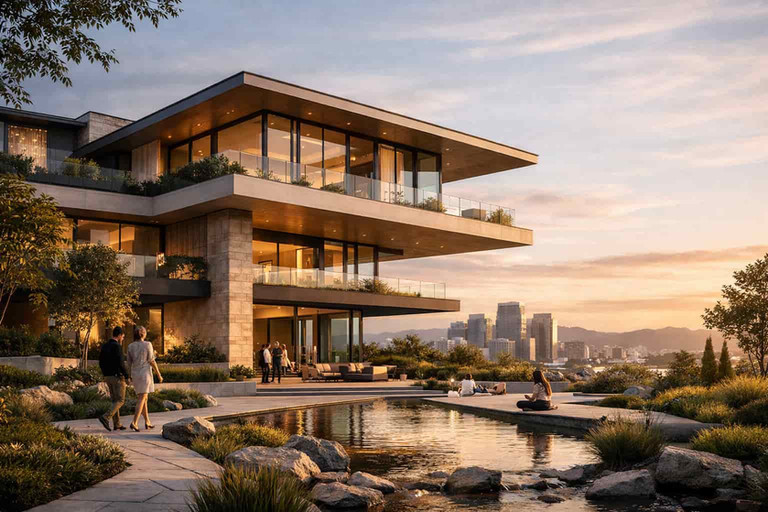
The single most important image: the building from its best angle, in its real context, at a time of day that fits the brand. It carries the website, the brochure cover, the listing and the hoarding, so it is made first and approved before the rest of the set.
Lifestyle and Amenity Views
Lifestyle renders show people using the place: a terrace at dinner time, the pool, the gym, the lobby or the café on the ground floor. They sell how it feels to live there rather than how the building looks, and the people in them give the spaces scale.
Interiors and the Model Unit
Interior views show the finishes, the light and the size of a typical unit, often the model unit the sales office will furnish. ArchiVinci's AI interior design tool renders a room from a photo, a sketch or a 3D view, and virtual staging furnishes a photo of an empty room; showing either to buyers is commercial use, which needs an active plan.
Aerial and Site Views for Large Developments
For a masterplan, a resort or a large residential scheme, an aerial view explains what a street-level image cannot: the layout of the site, the roads, the landscape, the shared amenities and the distance to the city, the park or the sea. Our guide to aerial renderings explains how they are made; ArchiVinci's Masterplan module turns a site plan or an aerial photo into an AI masterplan rendering.
Floor Plans for Brochures and Listings
Buyers compare units on plans as much as on images, so every unit type needs a clean plan with room names and areas for the brochure and the listing. In Floor Plan Maker, a free floor plan creator for desktop browsers, you draw each unit or upload a plan image or PDF for AI to rebuild as an editable plan, then add rooms with their areas, dimension lines and furniture, check it in 3D and export PNG, PDF or SVG for the brochure layout.
Draw the unit plans for your brochure Draw each unit in Floor Plan Maker, upload a plan image or PDF for AI to rebuild, or generate a first layout from a short brief. Add rooms with their areas, furniture from a 153-piece library and dimension lines, check it in 3D or in a first-person walkthrough, then export PNG, PDF, SVG or DXF. Drawing, 3D and exports are free in a desktop browser; reading an uploaded plan with AI costs 1 credit on a free account. |
A Short Video
A short clip adds movement to social media and the landing page; a full animation or walkthrough is a separate deliverable with its own budget. ArchiVinci turns an approved still into a 10-second clip with a camera movement such as Pan, Tilt or Zoom in (AI render to video); videos use coins, which come with every plan.
Light, Time of Day and Composition
Lighting and time of day change how a project is perceived. A golden-hour view suggests warmth and aspiration; a dusk view with the interior lights on shows life inside and the building's character after dark. Materials have to look believable in the chosen light, and our guide to lighting in renders explains how light, shadow and time of day are set.
To compare moods before the campaign look is fixed, ArchiVinci's AI exterior rendering tool has lighting buttons such as Golden hour and Twilight: the same upload and the same prompt gave both versions below. No button gives a full night scene; that is a typed request in the Edit module, with examples on the page to relight a render. Using the results in a campaign needs an active plan.

Two results of the Exterior module from the same upload and the same prompt, on the default engine. Left: the Golden hour button. Right: the Twilight button.
Composition does the rest:
People and entourage show scale, lifestyle and how the spaces are used.
Vegetation and landscape soften the massing, add depth and place the building in its setting.
Camera position and framing set the hierarchy: eye-level views show what a resident will see, higher views explain the site.
Marketing Renders for Real Estate: Off-Plan and Pre-Sales
In real estate, marketing renders are sales tools: they carry off-plan sales, pre-sales campaigns and investor presentations, so they usually appear before construction begins. Buyers commit money on the strength of these images, which is why credibility matters as much as beauty (see how to keep them honest).
The views follow the buyer. A high-end residential project usually needs more interiors, more lifestyle views and more careful post-production; a mid-range development leans on clear floor plans, practical interiors and the shared amenities. In both cases the set answers what buyers ask first: what they will see from the window, how big the rooms are and what they share with their neighbours.
Off-Plan Projects: The Hero Image Comes First
In off-plan projects, marketing renders are often produced at the concept stage to give the development an identity before construction begins. A single hero exterior image can position it as aspirational by combining lighting mood, lifestyle cues and human scale, supporting early sales and investor talks. Before a studio is booked, an AI render generator can test that hero view in seconds from a screenshot of the model or a sketch; using the result in the campaign needs an active plan.
Create marketing visuals from your design Upload a sketch, a 3D model view or a photo, describe materials and light, and ArchiVinci renders it as a photorealistic image in your browser. Commercial use needs an active plan. A new account starts with 3 free credits. |
Crops and Formats for Each Channel
The same project appears in very different frames, from a wide website banner to a vertical phone screen. Plan the crops before the camera of each view is approved: a view composed for a wide banner rarely survives a 9:16 crop, so ask for vertical versions to be composed, not cut out afterwards.
Channel | Format to plan for | What to watch |
|---|---|---|
Website hero and landing page | Wide landscape, with room for the headline | Keep the building clear of the text area |
Brochure and print | Print size, CMYK colours and bleed set by the printer | Leave room for copy; screen images are RGB |
Instagram feed | 1:1 recommended; 1.91:1 to 4:5 supported, taller images cropped to 4:5 | Ratios from Meta's media requirements, as of October 2026 |
Instagram Stories | 9:16 vertical | Compose a vertical version of the hero |
Listing portals | Landscape images that still read as small thumbnails | Lead with the hero and one interior |
Site hoarding and billboards | Very wide or very tall formats, printed large | One strong view and few details |
Investor and sales presentations | Landscape slides | The full set, with plans and the aerial view |
Check the current sizes in each platform's own settings before the campaign goes live, since they change.
How to Brief Marketing Renders
A rendering studio, or your own team, can only show what it is given. A good brief contains:
The model and drawings: the 3D model in the format your design tool exports (RVT, DWG, IFC or SKP, for example), or at least plans, elevations and screenshots of the model.
Finishes and materials: facade, glazing, floors, kitchens and bathrooms, with product references or photos.
A named view list: each view's job and channel, with the camera positions marked on a plan.
Time of day and season for each view, and the mood the brand wants.
People and entourage: who the buyers are, and the landscaping and cars as designed.
The real context: site photos or drone shots of the neighbours, streets and views.
Open decisions: what is not final yet, so that it is shown loosely or left out.
Formats and deadlines: the channel list above, print sizes from the printer and the launch date.
The price per image depends on the studio, the view and the number of revision rounds; our guide to how studios price renderings explains the factors.
Branding, Consistency and High-End Visualization
Branding visualization ensures renders align with a unified visual identity. Color grading, lighting style, and composition remain consistent across assets. This consistency builds recognition and trust. In contrast to isolated images, campaigns require cohesion.
High end visualization describes quality, not a fixed style. It focuses on detail control, realism, and polish. Photorealistic rendering is common, but not mandatory. Minimal or stylized visuals can also meet premium standards when executed precisely.
In practice, consistency comes from a few fixed decisions: one camera height and lens family for the series, one colour grade, a time of day per group of views and the same people and planting style throughout. With AI tools, keep the same material and light words in every prompt and pick the results that match, since each run generates a new image. A strong portfolio follows the same rule once the project is built.
Conceptual Visualization and Design Communication
Conceptual visualization supports early-stage design storytelling by communicating architectural intent, massing, and spatial logic. These visuals are commonly used in competition submissions and client reviews, where clarity of concept is more important than technical detail. Most importantly, they articulate design intent before material and construction decisions are finalized.
Conceptual renders intentionally simplify materials, context, and detail. The focus remains on form, proportion, and structure. Although they are less detailed, they still rely on a strong visual narrative. In this context, abstraction becomes a strategic communication tool rather than a limitation.
Typical uses of conceptual visualization include:
Architectural competition renders that communicate an idea clearly and persuasively.
Client presentations and design reviews that support discussion and agreement on a direction.
Investor presentations that explain the long-term vision and development potential.
Keep Marketing Renders Honest
Marketing renders show something buyers cannot yet check, so most problems start when an image promises more than the project will deliver. A few rules keep a campaign credible:
Show the real context. Do not remove neighbouring buildings, a road or a blocked view. In South Africa, the Advertising Regulatory Board withdrew an ad for a Cape Town development because its image had edited out the neighbouring homes, and it did not accept the "artist's impression" defence, as Bizcommunity reported in November 2024.
Label the images. A line such as "artist's impression" or "computer-generated image" tells buyers the picture is not a photograph, but it does not make a misleading picture acceptable.
Check the local rules for property ads. In Dubai, for example, real estate ads in print, outdoor, electronic and other media need an ad permit from the Dubai Land Department, and its permit page states, as of October 2026, that off-plan properties not registered with its Escrow Account Department may not be showcased.
Check every AI image against the design. An AI tool can add or change details, such as a window, a balcony, a tree or a material, so compare each result with the drawings before it is published.
Advertising rules differ by country and change over time; this is not legal advice, so check the rules of your market before a campaign runs.
Who Makes Marketing Renders: Studios, Render Engines or Online Tools
There are three routes, and many teams combine them. A rendering studio builds the final, modeled set when the design is frozen and the budget allows; it prices per image and per revision round. An in-house team with a render engine such as Enscape, Lumion, Twinmotion or D5 Render renders from the project's own model, which suits firms that make visuals for every project. An online AI tool suits the stage while the design is still open: hero tests, lighting variants, quick interiors and social clips.
ArchiVinci works in the browser, so no local GPU or render farm is needed. Upload a screenshot of a model view, a sketch or a photo (JPG, PNG or WebP up to 5 MB), describe the materials and the light, and AI rendering generates a new image that follows your image in seconds. The default engine is asked to keep the perspective and geometry, but details can change, so check each result against the design and run it again until one is good enough for the campaign.

Left: the uploaded image. Right: the result of the prompt "Modern house with white plaster walls, timber cladding on the upper floor, large glass openings, a lawn and a few trees." in the Exterior module, with the Daylight button, on the default engine.
The Exterior and Interior modules cover the hero and the interiors, the Masterplan module the aerial and site views, and the Edit module changes a marked area or the light of an image you already have. With no picture yet, the Imagine module creates concept images from a prompt, and the Video module turns an approved still into a short clip. ArchiVinci does not open model files and lettering or logos rarely come out readable, so signage and final text are added in post-production. A new account starts with 3 free credits; with a plan, renders on ArchiVinci's own engine are unlimited, and using the images for clients or in marketing is commercial use, which needs an active plan (plans are on the pricing page).
Try it in ArchiVinci
Upload a render and ArchiVinci turns it into a 10-second video with camera motion; videos use coins, which come with every plan. For still images, a new account starts with 3 free credits.
For a short video: AI video render
Render a sketch, photo or model view: AI rendering software
Frequently Asked Questions
What is a marketing render in architecture?
A marketing render is a visualization created to promote architectural projects through clear visual storytelling. Its main goal is to communicate the idea, atmosphere, and value of a project rather than just its physical form.
How many renders does a real estate campaign need?
It depends on the size of the project and the channels. A small residential project can launch with a hero exterior, two or three interiors and the floor plans; a large development adds lifestyle and amenity views, an aerial view and a short video. One rendering studio, RM Design Studio, gives five to fifteen still views as a reference point, not as a norm.
Can one render be used for the website, the brochure and social media?
Partly. The hero usually serves every channel, but each channel needs its own crop: a wide frame for the website, print colours and bleed for the brochure, 1:1 or 4:5 for the Instagram feed and 9:16 for Stories. Plan those crops before the camera is approved, so the building is not cut off in the vertical versions.
Who needs architectural marketing renders?
Architectural marketing renders are needed by anyone who must communicate, sell, or evaluate a project before it is built. They are primarily used by developers, architects, marketing teams, and investors to translate design intent into a clear, persuasive visual message.
How early should marketing renders be produced in a project timeline?
Marketing renders can be produced as early as the concept or schematic design stage, once the main idea and massing are defined, so that they support off-plan sales and investor presentations long before construction begins. Show only what is decided: finishes, landscaping or views that may still change are shown loosely or left out, and the images are updated when the design changes.
How does an architectural marketing render differ from technical renders?
Architectural marketing renders focus on perception, lifestyle, and branding, while technical renders prioritize construction accuracy, dimensions, materials, and buildability. Marketing visuals are designed to persuade; technical visuals are designed to inform builders and consultants.
Why are people included in lifestyle renders?
People provide scale, context, and emotional connection. They help viewers imagine how spaces are used in real life, making the project feel relatable and lived-in rather than abstract.
Are photorealistic renders always required for marketing?
No. While photorealism is common, some marketing strategies use stylized, illustrative, or conceptual visuals. The right approach depends on the target audience, brand identity, and communication goals.
When are pre-sales render images most effective?
Pre-sales render images are most effective during off-plan marketing, before construction begins. They allow developers to present the project early, generate interest, and support sales when no physical building exists yet.
Do marketing renders need an "artist's impression" label?
No single rule applies everywhere, so check the advertising rules of your market. A label such as "artist's impression" or "computer-generated image" tells buyers the picture is not a photograph, but it does not excuse a misleading one: South Africa's Advertising Regulatory Board rejected that defence when it withdrew a property ad whose image had removed the neighbouring homes.
What files does a rendering studio need?
The 3D model in the format your design tool exports (RVT, DWG, IFC or SKP, for example) or at least plans, elevations and model screenshots, plus the finish schedule, a named list of views with camera positions, the time of day for each view, site photos of the real context and the formats each channel needs.