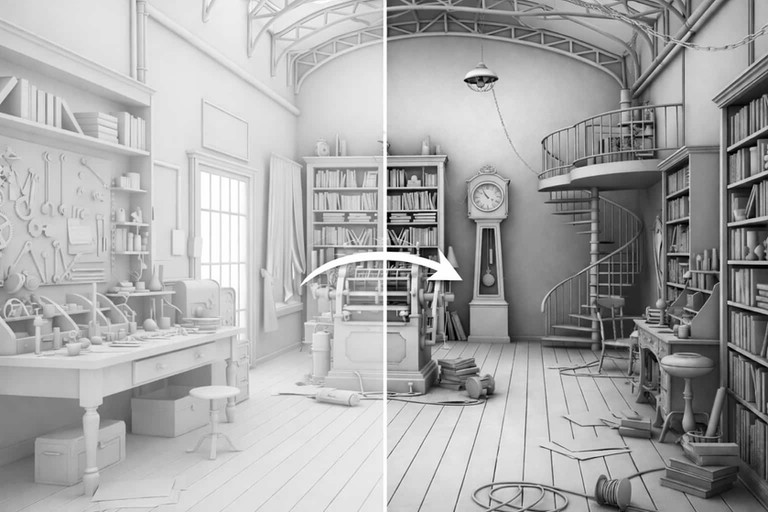
Updated on: 24 October 2026
Ambient occlusion (AO) is a shading technique that darkens the places ambient light can barely reach: inside corners, narrow gaps and the spots where objects touch. It does not simulate light: in simple terms, it measures how open each point is to its surroundings, which is why it adds depth to clay renders, game scenes and 3D previews.
Hayden Landis and colleagues at Industrial Light & Magic developed it for film production (2002), Crytek brought it to real-time games with Crysis (2007), and SketchUp added it as a face style in 2024. This guide explains how AO works, compares SSAO, HBAO+, GTAO, CACAO, ray-traced and baked AO in one table, says when to turn it on or off, and shows where to find it in Blender, SketchUp, V-Ray, Corona and D5 as of October 2026.
What Is Ambient Occlusion?
Ambient occlusion is a shading technique that adds depth by darkening areas where surfaces are close to each other, such as corners, edges, and intersections. Instead of calculating physical light behavior, it evaluates how nearby geometry restricts open space around a surface point. This approach helps represent depth cues, contact regions, and spatial relationships in a scene.
In practice, ambient occlusion produces darker values in corners, creases, and tight intersections where surrounding geometry limits exposure. Areas with fewer obstructions receive lighter values. As a result, surfaces show clearer separation cues even under simplified lighting conditions.
Ambient occlusion does not simulate physical light transport or energy transfer. Instead, it provides a geometric approximation of indirect shadowing. For this reason, it is often described as a non-physical but practical approximation used to support visual interpretation.
Because ambient occlusion is typically computed as a non-directional accessibility term, its base effect tends to remain relatively stable as lighting conditions change. However, its visual influence depends on how it is combined with lighting or shading during rendering.

Ambient Occlusion Examples
You can see the effect AO imitates in any room:
Corners: the line where two walls meet the ceiling looks darker than the middle of the wall.
Contact points: the floor right under a sofa or a cabinet, and the foot of a column on its plinth.
Gaps and grooves: the joints between tiles or bricks and the spaces between books on a shelf.
Deep openings: the inside of a tube gets darker the deeper you look, and so does a window set in a very thick wall.
Overcast light: AO alone makes a model look as it would on an overcast day, with soft shading and no sharp shadows.
In games, AO keeps characters and objects from looking as if they float above the floor.
How Does Ambient Occlusion Work?
Ambient occlusion works by evaluating how much surrounding geometry limits open space around a surface point, rather than simulating physical light behavior. This approach makes depth and contact areas easier to interpret.
The process can be summarized through the following steps:
Sampling the surrounding hemisphere around a surface point to evaluate available space.
Checking which directions are blocked by nearby geometry and which remain open.
Calculating an occlusion value from the share of blocked directions, where directions close to the surface normal count most and only geometry within a set distance counts: the Distance or Radius setting in Blender, SketchUp, V-Ray and D5.
Assigning darker values to highly enclosed areas, such as corners and intersections.
Assigning lighter values to open areas with fewer surrounding surfaces.
As a result, corners, creases, and junctions appear darker because geometry restricts exposure in those regions. These areas naturally receive less open space, which increases occlusion strength.
Ambient occlusion measures local geometric proximity, not physical light behavior. It focuses on spatial enclosure rather than energy transport. This distinction explains why its results differ from global illumination while still supporting depth perception.
How Is Ambient Occlusion Used in Architectural Rendering Workflows?
Architects and visualization artists use ambient occlusion to make form, edges, joints and intersections easier to read, which helps viewers understand how elements relate in space, especially in complex interiors or dense exterior scenes.
It is commonly applied during early design and clay rendering stages. At this point, materials are simplified and lighting is minimal. Ambient occlusion provides depth without visual noise, which supports early design decisions.
Typical use cases include:
Concept and massing studies
Clay or white model renders
Architectural diagrams
Detail and junction studies
Post-production enhancement
Only a floor plan so far? Floor Plan Maker rebuilds an uploaded plan image, PDF or hand sketch with AI as an editable plan in a desktop browser, or lets you draw one, shows it in an isometric 3D or massing view and exports GLB or OBJ for Blender or SketchUp, where you can switch on ambient occlusion for a clay study.
What Is an Ambient Occlusion Map and How Is It Used?
An ambient occlusion map is a grayscale texture that stores occlusion values across a surface. White areas represent open exposure, while darker areas indicate stronger occlusion. These values influence shading during rendering or compositing.
Ambient occlusion maps are usually created through a process called baking. Baking computes occlusion once and stores it in a texture. This improves performance because calculations are not repeated during rendering.
Because ambient occlusion maps influence surface shading, they belong to a material's texture set, next to its color, roughness and normal maps.
There are two common approaches:
Texture-based AO applied to materials
AO baked into lightmaps used by rendering engines
Each approach has limitations. Baked ambient occlusion is static and does not respond to moving objects. In addition, texture resolution and scale strongly affect accuracy, so careful setup is required.
Accurate results also depend on proper UV mapping, since occlusion values are baked and stored across surface coordinates.
How Does Ambient Occlusion Fit into the Rendering Pipeline?
Ambient occlusion is often generated as a separate render pass, so artists can adjust its strength during compositing without changing lighting or materials. The pass is usually blended with multiply or a similar darkening operation, which darkens contact areas while preserving base color; careful intensity control prevents excessive contrast.
Within physically based workflows, an AO map reduces only indirect (ambient) light; direct light from the sun or lamps is not affected. The glTF 2.0 specification, the common format for exchanging 3D models, stores the occlusion value in the red channel of a material's occlusion texture, with an optional strength that weakens the effect.
In this context, ambient occlusion complements a physically based lighting setup by reinforcing contact areas without adding lights.
Types of Ambient Occlusion: SSAO, HBAO+, GTAO, RTAO and Baked AO
AO methods differ in where they look for the geometry that blocks light: in the image on screen, in the scene itself or in a texture computed in advance. That choice decides their speed, their accuracy and where you meet them; the table at the end of this section compares them side by side.
Screen Space Ambient Occlusion (SSAO)
Screen space ambient occlusion calculates occlusion using depth and normal data visible on the screen: for every pixel, a shader samples the depth around it and darkens the pixel where nearby surfaces stand in front. It operates only on information available in the current frame, needs no preprocessing and runs entirely on the GPU, so it is fast and works with moving objects. Vladimir Kajalin developed it at Crytek, and Crysis (2007) was the first game to use it; NVIDIA notes that games most often use screen-space AO.
However, screen space ambient occlusion cannot detect geometry outside the camera view or hidden behind other objects. This limitation can cause missing occlusion near screen edges or thin elements, and dark halos around objects in the foreground. Despite this, it remains widely used because of its high performance efficiency.
Horizon-Based Ambient Occlusion (HBAO / HBAO+)
Horizon-Based Ambient Occlusion (HBAO) is NVIDIA's advanced variation of screen space ambient occlusion, developed to improve accuracy and edge definition. Unlike basic SSAO, it evaluates occlusion based on horizon angles in the depth buffer, which makes the sampling process direction-aware.
This approach produces smoother gradients and more stable contact shadows, especially around edges and corners. For speed, HBAO was usually rendered at half resolution, which caused flicker. HBAO+, NVIDIA's rebuilt version, renders at full resolution with cache-efficient interleaved rendering; according to NVIDIA, it doubles the level of AO detail and runs three times faster than HBAO. NVIDIA provides it to developers in its ShadowLib library.
Ground Truth Ambient Occlusion (GTAO)
Ground Truth Ambient Occlusion (GTAO) comes from Activision's research team. It is a screen-space method that, according to its authors, gives better results than HBAO while running as fast as one of the fastest screen-space techniques, and it aims at more physically plausible shading. Some games list it by name in their graphics settings.
HDAO and AMD FidelityFX CACAO
High Definition Ambient Occlusion (HDAO) was AMD's screen-space technique; Corsair describes it as AMD's answer to HBAO, with higher precision and better depth handling. Today it is a legacy option that you mostly meet in technical comparisons.
AMD's current method is FidelityFX CACAO (Combined Adaptive Compute Ambient Occlusion), part of the AMD FidelityFX SDK: an AO implementation optimized for AMD's RDNA architecture, for DirectX 12 and Vulkan, that runs at several quality settings across a wide range of hardware. AMD names DIRT 5 and World of Warcraft: Shadowlands among the games that use it.
Ray-Traced Ambient Occlusion (RTAO)
Ray traced ambient occlusion evaluates occlusion by casting rays into the scene geometry. It measures real geometric intersections rather than relying on screen data. As a result, it produces more accurate and stable spatial shading.
In real time, this method needs a graphics card with hardware ray tracing, which arrived with NVIDIA's GeForce RTX 20 series in 2018; our guide to modern GPU options compares current cards. In Unity's HDRP, for example, ray tracing is an option of the AO override and is more accurate than SSAO because it uses off-screen data. Offline renderers such as Blender Cycles and V-Ray also trace rays for AO, without a real-time frame budget.
Voxel Ambient Occlusion (VXAO)
Voxel Ambient Occlusion (VXAO), as NVIDIA calls it, is the ambient occlusion mode of NVIDIA's VXGI voxel global illumination: it computes occlusion from a voxelized representation of the scene. Instead of relying on screen space information, it evaluates spatial relationships in a volumetric grid. This allows it to capture occlusion from off-screen and hidden geometry.
According to NVIDIA, VXAO gives results much better than HBAO+ but takes three to four times as long, while running two to ten times faster than full global illumination. Memory is not the obstacle: its voxel textures take 6 to 100 MB. VXAO dates from around 2016, when it reached its first game through a Rise of the Tomb Raider patch for enthusiast-class GPUs, and a VXGI branch of Unreal Engine 4.10 offered it to developers. Today it counts as a legacy technique.
Baked Ambient Occlusion
Baked ambient occlusion is precomputed and stored in texture maps. The occlusion values are calculated once and reused during rendering. This approach provides stable results and low runtime cost.
However, baked ambient occlusion is static. It does not react to moving objects or changing geometry. Therefore, it is best suited for static architectural elements and background assets.
Real-Time Versus Offline Ambient Occlusion
Real-time ambient occlusion focuses on performance and interactivity. It includes screen-based and ray-traced methods used in interactive engines. These techniques prioritize speed and responsiveness.
Offline ambient occlusion prioritizes accuracy and consistency for final renders. It is commonly used in high-quality still images or cinematic visualization. Many workflows combine both approaches to balance quality and efficiency.
Ambient Occlusion Types Compared
Method | Where it finds occluders | Strengths | Limits | Where you meet it (October 2026) |
|---|---|---|---|---|
SSAO | Depth of the current frame | Fast, no preprocessing, works with moving objects | Misses off-screen and hidden geometry; halos near edges | Many games; Unity URP; Blender EEVEE's fast GI |
HBAO+ (NVIDIA) | Depth buffer, along horizon angles | Better-defined contact shadows; full resolution; about 3× faster than HBAO | Screen-space limits | Graphics settings of PC games |
GTAO (Activision) | Depth of the current frame | Better than HBAO at the speed of the fastest screen-space methods | Screen-space limits | Graphics settings of some games |
FidelityFX CACAO (AMD) | Depth of the current frame | Several quality levels, wide hardware support | Screen-space limits | AMD FidelityFX SDK (DirectX 12, Vulkan) |
HDAO (AMD, legacy) | Depth of the current frame | More precision than basic SSAO | AMD's current method is CACAO | Technical comparisons |
Ray-traced AO (RTAO) | Rays traced against the scene | Most accurate in real time; sees off-screen geometry | Needs hardware ray tracing; the heaviest cost | Ray-tracing settings of games; Unity HDRP |
VXAO (NVIDIA, legacy) | A voxel copy of the scene around the camera | Sees off-screen and hidden geometry | 3–4× slower than HBAO+ | Around 2016: one game patch and a UE 4.10 branch |
Baked AO | Textures or lightmaps computed in advance | No runtime cost, stable | Static; needs UVs and enough texture resolution | Game assets; glTF occlusion textures |
Offline AO in renderers | Rays traced per image or in a pass | Accurate, adjustable radius, a separate pass for compositing | Adds render time | Blender Cycles; V-Ray (VRayDirt) |
How Does Ambient Occlusion Compare to Global Illumination?
Global illumination simulates how light bounces between surfaces. It models indirect lighting and energy transfer across a scene. Ambient occlusion does not perform this simulation.
Instead, ambient occlusion estimates how geometry limits exposure to surrounding space. It enhances contact shadows but does not generate real light interaction. Therefore, the two techniques serve different purposes.
Used together, they complement each other. Global illumination defines overall lighting behavior, while ambient occlusion strengthens local depth. This combination improves both realism and readability.
In contrast, path tracing focuses on fully simulating indirect light behavior, prioritizing physical accuracy over approximation.
AI rendering takes a different route: it generates a new image that follows an uploaded view instead of computing light, so depth and contact shading are part of the picture rather than a pass you adjust.
Should You Turn Ambient Occlusion On or Off?
It depends on where you see it. AO makes objects look grounded and spaces read in depth, but every method has a cost: GPU time in every frame in real time, or extra render time in a still image.
In Games and Real-Time Viewers
Turn it on if your frame rate stays stable: AO makes interiors and slower, exploration-focused scenes look more natural.
Lower it or turn it off when every frame counts, as in competitive multiplayer, or when deep shadows make details hard to see.
Start low: begin with SSAO at a low quality and raise it until the frame rate drops; a smaller radius keeps large areas from turning dark.
Mind the method: the screen-space methods (SSAO, HBAO+, GTAO, CACAO) are the light options; ray-traced AO is the most accurate but needs a graphics card with hardware ray tracing and costs the most.
Watch for double darkening: if a scene already has AO baked into its textures or lightmaps, real-time AO on top can make corners look sooty; reduce its intensity or turn the extra pass off.
In Architectural Renders
Clay, massing and diagram views: keep AO on; it is what makes a white model read. SketchUp's AO face style and D5's AO style mode are made for this look.
Photorealistic stills with global illumination: AO is optional. Path tracing already produces contact shadows, so add AO only as a subtle pass in compositing, or skip it.
Real-time walkthroughs for clients: treat them like a game and keep AO on while the viewer runs smoothly on the presentation computer.
How to Use Ambient Occlusion in Blender, SketchUp, V-Ray, Corona and D5
Each of these tools has its own AO control, and each puts it in a different place. As of October 2026:
Software | Where to find AO | Main settings | AO as a separate image |
|---|---|---|---|
Blender 5.2 LTS | Cycles: the Ambient Occlusion node in materials, or Render › Light Paths › Fast GI Approximation; EEVEE: Fast GI Approximation with the Ambient Occlusion method, a screen-space effect | Node: Distance, Samples, Inside, Only Local; Fast GI: AO Factor, AO Distance | The Ambient Occlusion pass (Cycles and EEVEE), grayscale for multiplying in the Compositor; the Ambient Occlusion bake type (needs a UV map) |
SketchUp 2024 and later | View › Face Style › Ambient Occlusion, with the new graphics engine, or a ready-made style from the Ambient Occlusion library in the Styles panel | Color controls, Distance, Intensity, Distance Multiplier | A display style, also shown in LayOut viewports |
V-Ray for 3ds Max | The VRayDirt texture map in Ambient occlusion mode | Radius (in scene units), Distribution (1.0 for an ambient-like spread), Falloff, Subdivs, Ignore for GI | VRayDirt is the map V-Ray uses to produce an AO pass |
D5 Render | The AO switch in the Effect panel, in preview and final render; the AO mode in the Style section, with Outline, for a clay look | Radius | Image Render › Channels › AO, as D5's guide shows |
Corona for 3ds Max has its own Corona AO Map, described in Chaos's Corona documentation. In Unity 6, URP offers SSAO as a Renderer Feature, and HDRP has an Ambient Occlusion override with a Ray Tracing option.
Working in SketchUp? The free ArchiVinci plugin sends the active view or a saved scene to ArchiVinci without leaving SketchUp, so a clay view of your model can become a photorealistic image: see SketchUp rendering with AI.
Weighing a render engine against an AI workflow? Our comparisons ArchiVinci vs Blender, ArchiVinci vs V-Ray, ArchiVinci vs Corona and ArchiVinci vs D5 Render set them side by side.
From a Clay Render to a Client-Ready Image
AO is at its best in clay and white-model renders, where it shows form before any material exists. The next step, a client-ready image with materials and daylight, usually means setting up materials, lights and a final render. An AI render from a 3D model view skips that setup: upload the clay render or a screenshot of the view (JPG, PNG or WebP up to 5 MB), describe the materials and light in a sentence or pick a lighting button such as Daylight or Golden hour, and ArchiVinci generates a photorealistic image that follows your upload, in seconds.

Example from our render page. Left: the uploaded image, a house without materials, all in plain white. Right: the result in the Exterior module with the prompt "Modern house with white plaster walls, timber cladding on the upper floor, large glass openings, a lawn and a few trees.", the Daylight button and the default engine.
ArchiVinci does not calculate ambient occlusion, light bounces or render passes, and it has no AO slider: the depth and contact shading are part of the new image. You steer the result with the prompt, a lighting button or another run, and every run draws a new image. The default engine is asked to keep your perspective and geometry; that is an instruction to the AI model, not a lock, so check details such as openings before you present. The Interior module's Ambient button asks for soft ambient light, a lighting mood rather than an AO setting. When you need an AO pass for compositing, render it in Blender, V-Ray, Corona or D5. Using the images for client work needs an active plan; plans are on the pricing page.
Turn your clay render into a photorealistic image Upload a clay render, a white-model view or a screenshot of your model and describe materials and light in a sentence: ArchiVinci generates a photorealistic image that follows your upload, in seconds. A new account starts with 3 free credits. |
What Are Best Practices for Using Ambient Occlusion in Architecture?
Ambient occlusion does not replace lighting; it subtly reinforces the relationships between surfaces, edges and volumes. These points keep that effect clear and true to scale:
Keep ambient occlusion subtle and controlled. Excessive darkening can flatten materials, reduce visual clarity, and misrepresent architectural scale.
Adjust occlusion radius and intensity to scene size. Large spaces benefit from broader, softer values, while fine details require tighter and more localized occlusion. Check the unit: V-Ray's VRayDirt, for example, sets its Radius in scene units.
Evaluate ambient occlusion in context. Its impact should be assessed together with lighting, materials, and camera distance rather than in isolation.
Focus occlusion on contact areas. Intersections, edges, and junctions gain the most from added depth cues and visual separation.
Avoid uniform application across surfaces. Applying ambient occlusion everywhere can weaken spatial hierarchy and make scenes feel visually compressed.
Do not darken twice. If your materials or lightmaps already carry baked AO, adding real-time or compositing AO on top makes corners look dirty; reduce one of them.
Reduce or disable ambient occlusion in highly realistic scenes. Where physical lighting and global illumination already define depth, additional occlusion may become redundant or distracting.
A Short History of Ambient Occlusion
Ambient occlusion moved from film studios to games and design software in about two decades:
2002: Hayden Landis and colleagues at Industrial Light & Magic develop ambient occlusion for film production, as NVIDIA's GPU Gems recounts.
2007: Crytek's screen space ambient occlusion, developed by Vladimir Kajalin, debuts in Crysis as the first real-time AO in a game.
Around 2016: NVIDIA's voxel-based VXAO reaches its first game.
2018: NVIDIA's GeForce RTX 20 series brings hardware ray tracing, and ray-traced AO becomes possible in real time.
2024: SketchUp 2024 adds an Ambient Occlusion face style with its new graphics engine.
Modern ray tracing and path tracing produce contact shadows on their own, yet AO remains a cheap, controllable layer for clay renders, diagrams and real-time viewers.
Key Takeaways
Ambient occlusion estimates geometric exposure rather than physical light behavior, making it a perceptual tool instead of a physically based lighting model.
It improves spatial clarity and depth perception by darkening corners, gaps and contact areas.
Screen-space methods (SSAO, HBAO+, GTAO, CACAO) are fast but miss off-screen geometry; ray-traced AO is more accurate but needs hardware ray tracing; baked AO costs nothing at runtime but is static.
In games and real-time viewers, keep AO on while the frame rate stays stable and lower it when every frame counts.
For architects, AO is most useful in clay renders, massing and concept views; in photorealistic stills with global illumination, keep it subtle or use it as a separate pass.
Ambient occlusion does not replace global illumination and works best as a supporting layer alongside physically based lighting.
Try it in ArchiVinci
Upload a clay render, a sketch, a photo or a 3D model view and describe the result in a sentence: ArchiVinci generates a new image that follows your upload, in seconds. A new account starts with 3 free credits.
Render a sketch, photo or model view: AI render generator
For a render you already have: Enhance renders with AI
Ambient Occlusion: Frequently Asked Questions
Does ambient occlusion lower FPS?
Yes. Every AO method costs GPU time in each frame, so turning it on lowers the frame rate; how much depends on the method, its quality setting and your graphics card. Simple SSAO is the lightest option, and ray-traced AO the heaviest. NVIDIA gives two ratios: its HBAO+ runs about three times faster than the older HBAO, and VXAO takes three to four times as long as HBAO+. If the frame rate drops, lower the AO quality or switch to a lighter method before you turn it off.
What is the difference between SSAO and HBAO?
Both are screen-space methods that work from the depth buffer of the current frame. SSAO, first used in Crysis in 2007, samples the depth around each pixel; HBAO, developed by NVIDIA, samples along horizon angles, which gives better-defined contact shadows in corners and creases. HBAO+, NVIDIA's newer version, renders at full resolution and runs about three times faster than HBAO. Neither can see geometry outside the screen; for that, games use ray-traced AO.
Is ambient occlusion the same as a shadow?
No. A shadow depends on a light and its direction: move the sun and the shadow moves. Ambient occlusion is non-directional: it darkens corners, gaps and contact points from the surrounding geometry alone, with no direct light involved, much like the soft shading of an overcast day. Renders use both: shadows from the lights and AO for contact shading.
What does occlusion mean in art?
In drawing and painting, ambient occlusion is the darkest part of a shadow, in the tight spaces light can hardly reach: the narrow gap where an object rests on a table, the inside of a bag, the crease under a chin. Artists add these small dark accents so that objects sit firmly on their surfaces, and architectural sketches use them at the foot of walls and under window sills.
Is ambient occlusion a replacement for real lighting or global illumination?
No. Ambient occlusion does not replace light sources or global illumination. It does not simulate light transport, indirect bounce, or energy conservation. Instead, it functions as a supporting component that enhances local depth cues. In practice, global illumination defines overall lighting behavior, while ambient occlusion refines how closely related surfaces visually separate from one another.
Why do screen-space ambient occlusion methods fail near edges or thin geometry?
Screen-space ambient occlusion relies only on information available in the rendered image, such as depth and normal buffers. Geometry that lies outside the camera view or behind other objects cannot be evaluated. As a result, occlusion may disappear or behave inconsistently near screen borders or along thin elements. This limitation is inherent to screen-space approaches.
Why should ambient occlusion be applied cautiously in photorealistic rendering?
In photorealistic rendering with physically based lighting, depth cues already emerge from accurate lighting, shadows, and indirect illumination. Applying strong ambient occlusion on top of these effects can over-darken contact areas and distort perceived scale. For this reason, ambient occlusion is typically used subtly or reduced in photorealistic scenes to avoid overpowering the lighting model.
How does ambient occlusion interact with lighting during rendering?
Ambient occlusion is computed independently of light direction, meaning its raw values do not depend on light position or intensity. However, its visual effect depends on how it is combined with lighting during shading or compositing. It is often multiplied with indirect or diffuse components, so changes in lighting can influence how strongly the occlusion appears in the final image.